<?xml version="1.0" encoding="utf-8"?><feed xmlns="http://www.w3.org/2005/Atom" ><generator uri="https://jekyllrb.com/" version="3.8.7">Jekyll</generator><link href="https://truzzi.me/feed.xml" rel="self" type="application/atom+xml" /><link href="https://truzzi.me/" rel="alternate" type="text/html" /><updated>2025-07-21T13:39:49+00:00</updated><id>https://truzzi.me/feed.xml</id><title type="html">Francesco Truzzi</title><subtitle></subtitle><author><name>{&quot;avatar&quot;=&gt;&quot;/assets/images/self.jpg&quot;, &quot;bio&quot;=&gt;&quot;Software Engineer&quot;, &quot;location&quot;=&gt;&quot;Milan, Italy&quot;, &quot;email&quot;=&gt;&quot;francesco@truzzi.me&quot;, &quot;uri&quot;=&gt;nil, &quot;home&quot;=&gt;nil, &quot;bitbucket&quot;=&gt;nil, &quot;codepen&quot;=&gt;nil, &quot;dribbble&quot;=&gt;nil, &quot;flickr&quot;=&gt;nil, &quot;facebook&quot;=&gt;nil, &quot;foursquare&quot;=&gt;nil, &quot;github&quot;=&gt;&quot;ftruzzi&quot;, &quot;gitlab&quot;=&gt;nil, &quot;google_plus&quot;=&gt;nil, &quot;keybase&quot;=&gt;nil, &quot;instagram&quot;=&gt;nil, &quot;lastfm&quot;=&gt;nil, &quot;linkedin&quot;=&gt;&quot;ftruzzi&quot;, &quot;pinterest&quot;=&gt;nil, &quot;soundcloud&quot;=&gt;nil, &quot;stackoverflow&quot;=&gt;nil, &quot;steam&quot;=&gt;nil, &quot;tumblr&quot;=&gt;nil, &quot;twitter&quot;=&gt;&quot;ftruzzi&quot;, &quot;vine&quot;=&gt;nil, &quot;weibo&quot;=&gt;nil, &quot;xing&quot;=&gt;nil, &quot;youtube&quot;=&gt;nil}</name><email>francesco@truzzi.me</email></author><entry><title type="html">Seamless TV DNS switching with dnsmasq and Home Assistant</title><link href="https://truzzi.me/seamless-tv-dns-switching-with-dnsmasq-and-home-assistant/" rel="alternate" type="text/html" title="Seamless TV DNS switching with dnsmasq and Home Assistant" /><published>2017-08-17T03:18:40+00:00</published><updated>2017-08-17T03:18:40+00:00</updated><id>https://truzzi.me/seamless-tv-dns-switching-with-dnsmasq-and-home-assistant</id><content type="html" xml:base="https://truzzi.me/seamless-tv-dns-switching-with-dnsmasq-and-home-assistant/"><![CDATA[<p>Some Black Friday ago, I happened to buy a lifetime subscription to <a href="https://www.getflix.com.au/">Getflix</a>. It’s a service that allows you to bypass Netflix regional restrictions by using their DNS servers. The advantage is that you don’t get stuck with lower speeds as you probably would with a VPN. The service has been working pretty well apart from a few outages some time ago (looks like Netflix is actively working against them) and I use it to watch US Netflix and Prime Video from Italy. I think there are other similar services so this guide will apply to those too.</p>

<!--more-->

<p>When I’m on my PC, I use <a href="http://www.sordum.org/7952/dns-jumper-v2-1/">DNS Jumper</a> to switch between Google and Getflix DNS servers. However, when I wanted to watch US Netflix on my LG TV I had to manually change the network configuration, not very comfortable with a remote. I couldn’t either leave the Getflix DNS always configured, as my family wouldn’t want to have English-only flicks nor lose some Italian-only movies Netflix probably offers.</p>

<p>The solution was to use my Raspberry Pi as a DNS server, point the TV to it and integrate a script into <a href="https://home-assistant.io/">Home Assistant</a> so I could manage the whole thing from my phone together with other lights and switches in my house.</p>

<p>The first thing to do is to install dnsmasq, a DNS and DHCP server, on your Pi:</p>
<div class="language-sh highlighter-rouge"><div class="highlight"><pre class="highlight"><code><span class="nb">sudo </span>apt-get <span class="nb">install </span>dnsmasq
</code></pre></div></div>

<p>I wasn’t interested on the DHCP part so I haven’t enabled it. By looking at the dnsmasq manual I found some interesting and useful features:</p>

<ul>
  <li>dnsmasq gets its upstream (i.e. ‘reference’) DNS servers from <code class="highlighter-rouge">/etc/resolv.conf</code>, a file that on my Pi was auto-generated by resolvconf. You can either change resolvconf configuration (via the <code class="highlighter-rouge">/etc/resolveconf.conf</code> file) or force dnsmasq to ignore the file and use specific DNS servers. I chose the second option.</li>
  <li>dnsmasq caches DNS queries, which is a good thing in general but bad for our use case. By sending a SIGHUP to its process, we can force a cache cleaning.</li>
</ul>

<p>We will now create two copies of the dnsmasq config file and a very simple script that switches between them.</p>

<p>We need to add (or uncomment) the following lines in the <code class="highlighter-rouge">/etc/dnsmasq.conf</code> file:</p>

<div class="highlighter-rouge"><div class="highlight"><pre class="highlight"><code># ignore the /etc/resolv.conf file
no-resolv

# probably redundant: ignore changes in /etc/resolv.conf
no-poll

listen-address=127.0.0.1
listen-address=YOUR_LAN_IP_ADDRESS
</code></pre></div></div>

<p>We can now copy the files:</p>

<div class="language-sh highlighter-rouge"><div class="highlight"><pre class="highlight"><code><span class="nb">sudo cp</span> /etc/dnsmasq.conf /etc/dnsmasq.nflx.conf
<span class="nb">sudo cp</span> /etc/dnsmasq.conf /etc/dnsmasq.goog.conf
</code></pre></div></div>

<p>Now we force Getflix DNS servers, appending the following to the <code class="highlighter-rouge">/etc/dnsmasq.nflx.conf</code> config file:</p>

<div class="highlighter-rouge"><div class="highlight"><pre class="highlight"><code>server=GETFLIX_DNS_SERVER_1
server=GETFLIX_DNS_SERVER_2
</code></pre></div></div>

<p>We then do the same for the <code class="highlighter-rouge">/etc/dnsmasq.goog.conf</code> file:</p>

<div class="highlighter-rouge"><div class="highlight"><pre class="highlight"><code>server=8.8.8.8
server=8.8.4.4
</code></pre></div></div>

<p>We can now write the script that handles the change between the two files. We  <code class="highlighter-rouge">touch /home/pi/dnschange</code> and edit it with our favorite text editor.</p>

<div class="language-sh highlighter-rouge"><div class="highlight"><pre class="highlight"><code><span class="k">if</span> <span class="o">[</span> <span class="s2">"</span><span class="nv">$1</span><span class="s2">"</span> <span class="o">=</span> <span class="s2">"google"</span> <span class="o">]</span><span class="p">;</span> <span class="k">then
        </span><span class="nb">cp</span> /etc/dnsmasq.goog.conf /etc/dnsmasq.conf
        <span class="nb">echo</span> <span class="s2">"Google DNS servers restored."</span>
<span class="k">fi

if</span> <span class="o">[</span> <span class="s2">"</span><span class="nv">$1</span><span class="s2">"</span> <span class="o">=</span> <span class="s2">"netflix"</span> <span class="o">]</span><span class="p">;</span> <span class="k">then
        </span><span class="nb">cp</span> /etc/dnsmasq.nflx.conf /etc/dnsmasq.conf
        <span class="nb">echo</span> <span class="s2">"Getflix DNS set."</span>
<span class="k">fi

</span>systemctl restart dnsmasq.service
killall <span class="nt">-s</span> SIGHUP dnsmasq
<span class="nb">echo</span> <span class="s2">"dnsmasq restarted."</span>
</code></pre></div></div>
<p>Make the script executable:</p>

<div class="language-sh highlighter-rouge"><div class="highlight"><pre class="highlight"><code><span class="nb">chmod</span> +x /home/pi/dnschange
</code></pre></div></div>

<p>We’re about done. By running <code class="highlighter-rouge">sudo /home/pi/dnschange netflix</code> we will be able to watch the US Netflix, and by running <code class="highlighter-rouge">sudo /home/pi/dnschange google</code>  we will revert back to Google DNS servers.</p>

<p>You can make sure the script is working by running <code class="highlighter-rouge">cat /etc/dnsmasq.conf | grep server=</code> and see if the file has the right servers inside.</p>

<p>Still, it would be quite unpractical to SSH into our Pi from the couch and run the two commands. Let’s integrate the thing with Home Assistant so we can easily run the script from our mobile web browser.</p>

<p>Edit the HA config file and add the following lines. For me, it’s in <code class="highlighter-rouge">/home/homeassistant/.homeassistant/configuration.yaml</code>:</p>

<div class="language-yaml highlighter-rouge"><div class="highlight"><pre class="highlight"><code><span class="na">switch</span><span class="pi">:</span>
  <span class="na">platform</span><span class="pi">:</span> <span class="s">command_line</span>
  <span class="na">switches</span><span class="pi">:</span>
    <span class="na">nflx_unblocker</span><span class="pi">:</span>
      <span class="na">friendly_name</span><span class="pi">:</span> <span class="s2">"</span><span class="s">Netflix</span><span class="nv"> </span><span class="s">US"</span>
      <span class="na">command_on</span><span class="pi">:</span> <span class="s2">"</span><span class="s">sudo</span><span class="nv"> </span><span class="s">/home/pi/dnschange</span><span class="nv"> </span><span class="s">netflix"</span>
      <span class="na">command_off</span><span class="pi">:</span> <span class="s2">"</span><span class="s">sudo</span><span class="nv"> </span><span class="s">/home/pi/dnschange</span><span class="nv"> </span><span class="s">google"</span>
</code></pre></div></div>
<p>Then, let’s add the homeassistant user to sudoers so it can run the commands as root without asking for a password (make sure your network is secure!), by editing the sudoers file</p>

<div class="language-sh highlighter-rouge"><div class="highlight"><pre class="highlight"><code><span class="nb">sudo </span>visudo
</code></pre></div></div>

<p>and adding the following line:</p>
<div class="highlighter-rouge"><div class="highlight"><pre class="highlight"><code>homeassistant ALL=NOPASSWD: ALL
</code></pre></div></div>

<p>We can now restart Home Assistant and we should be ready to go.</p>

<div class="language-sh highlighter-rouge"><div class="highlight"><pre class="highlight"><code><span class="nb">sudo </span>systemctl restart home-assistant@homeassistant.service
</code></pre></div></div>

<p>This is how the switch looks on my phone. I’m still a Home Assistant newbie so the interface is a bit bare, but I plan on adding automatic blinds and more lights in the coming weeks.</p>

<figure> <a href="/assets/images/openhab_screenshot.png">
  <img src="/generated/assets/images/openhab_screenshot-623-c9bff2.png" srcset="/generated/assets/images/openhab_screenshot-400-c9bff2.png 400w, /generated/assets/images/openhab_screenshot-600-c9bff2.png 600w, /generated/assets/images/openhab_screenshot-623-c9bff2.png 623w" sizes="(max-width: 600px) 100vw, (max-width: 900px) 80vw, (max-width: 1200px) 60vw, (max-width: 1800px) 50vw, (min-width: 1801px) 40vw" />
</a>
 </figure>

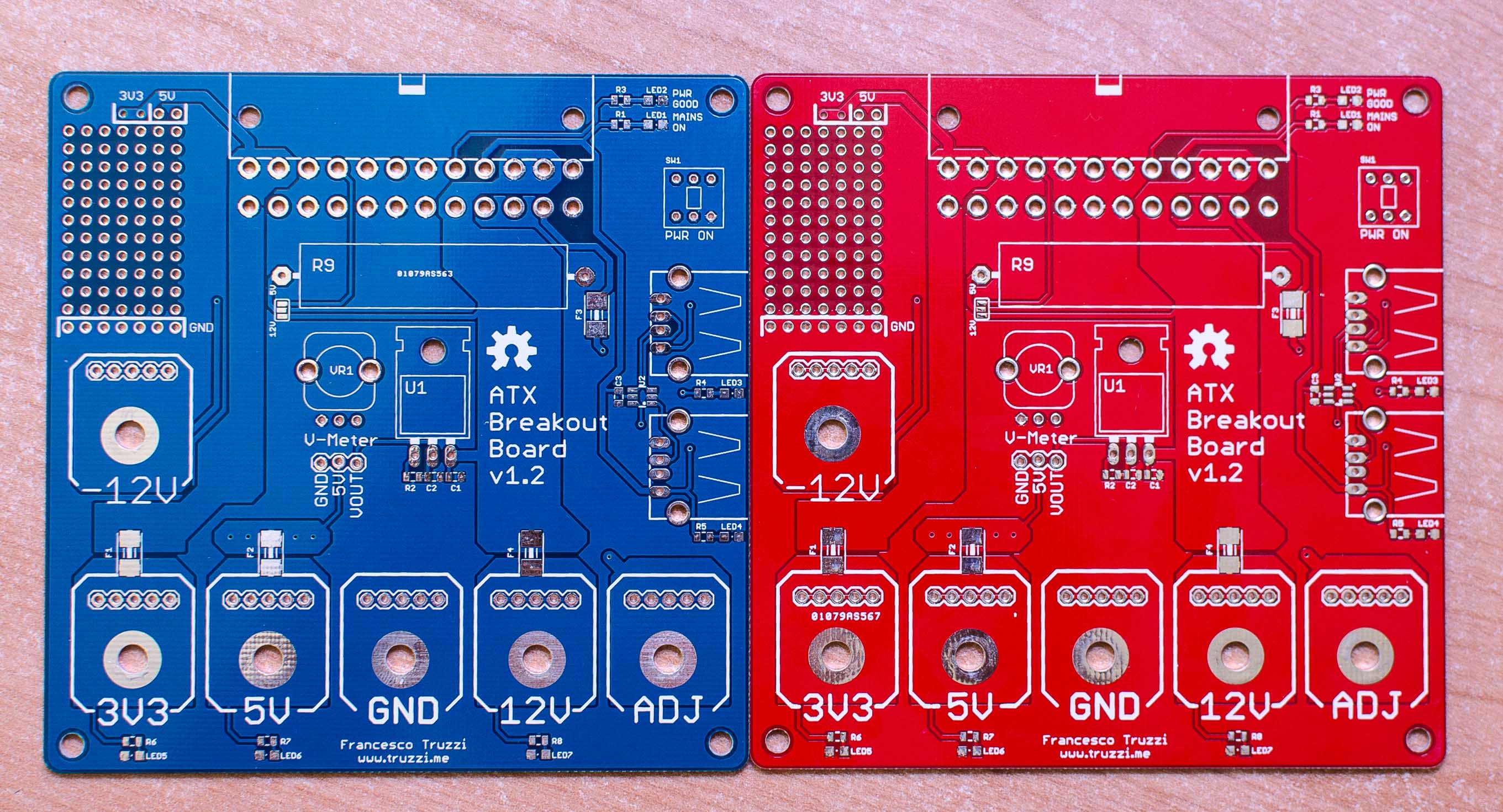
<p>It’s quite a dirty hack and could be integrated better (e.g. we could make HA verify the DNS change) but it works perfectly for me: the only thing I have to do is kill and re-open the Netflix app on my TV. Happy watching!</p>]]></content><author><name>{&quot;avatar&quot;=&gt;&quot;/assets/images/self.jpg&quot;, &quot;bio&quot;=&gt;&quot;Software Engineer&quot;, &quot;location&quot;=&gt;&quot;Milan, Italy&quot;, &quot;email&quot;=&gt;&quot;francesco@truzzi.me&quot;, &quot;uri&quot;=&gt;nil, &quot;home&quot;=&gt;nil, &quot;bitbucket&quot;=&gt;nil, &quot;codepen&quot;=&gt;nil, &quot;dribbble&quot;=&gt;nil, &quot;flickr&quot;=&gt;nil, &quot;facebook&quot;=&gt;nil, &quot;foursquare&quot;=&gt;nil, &quot;github&quot;=&gt;&quot;ftruzzi&quot;, &quot;gitlab&quot;=&gt;nil, &quot;google_plus&quot;=&gt;nil, &quot;keybase&quot;=&gt;nil, &quot;instagram&quot;=&gt;nil, &quot;lastfm&quot;=&gt;nil, &quot;linkedin&quot;=&gt;&quot;ftruzzi&quot;, &quot;pinterest&quot;=&gt;nil, &quot;soundcloud&quot;=&gt;nil, &quot;stackoverflow&quot;=&gt;nil, &quot;steam&quot;=&gt;nil, &quot;tumblr&quot;=&gt;nil, &quot;twitter&quot;=&gt;&quot;ftruzzi&quot;, &quot;vine&quot;=&gt;nil, &quot;weibo&quot;=&gt;nil, &quot;xing&quot;=&gt;nil, &quot;youtube&quot;=&gt;nil}</name><email>francesco@truzzi.me</email></author><category term="software" /><summary type="html"><![CDATA[Some Black Friday ago, I happened to buy a lifetime subscription to Getflix. It’s a service that allows you to bypass Netflix regional restrictions by using their DNS servers. The advantage is that you don’t get stuck with lower speeds as you probably would with a VPN. The service has been working pretty well apart from a few outages some time ago (looks like Netflix is actively working against them) and I use it to watch US Netflix and Prime Video from Italy. I think there are other similar services so this guide will apply to those too.]]></summary></entry><entry><title type="html">New ATX Breakout Board PCBs (with some improvements!)</title><link href="https://truzzi.me/new-atx-breakout-board-pcbs-with-some-additions/" rel="alternate" type="text/html" title="New ATX Breakout Board PCBs (with some improvements!)" /><published>2015-07-13T12:30:03+00:00</published><updated>2015-07-13T12:30:03+00:00</updated><id>https://truzzi.me/new-atx-breakout-board-pcbs-with-some-additions</id><content type="html" xml:base="https://truzzi.me/new-atx-breakout-board-pcbs-with-some-additions/"><![CDATA[<p>Hello everyone, I’ve got some good news today!</p>

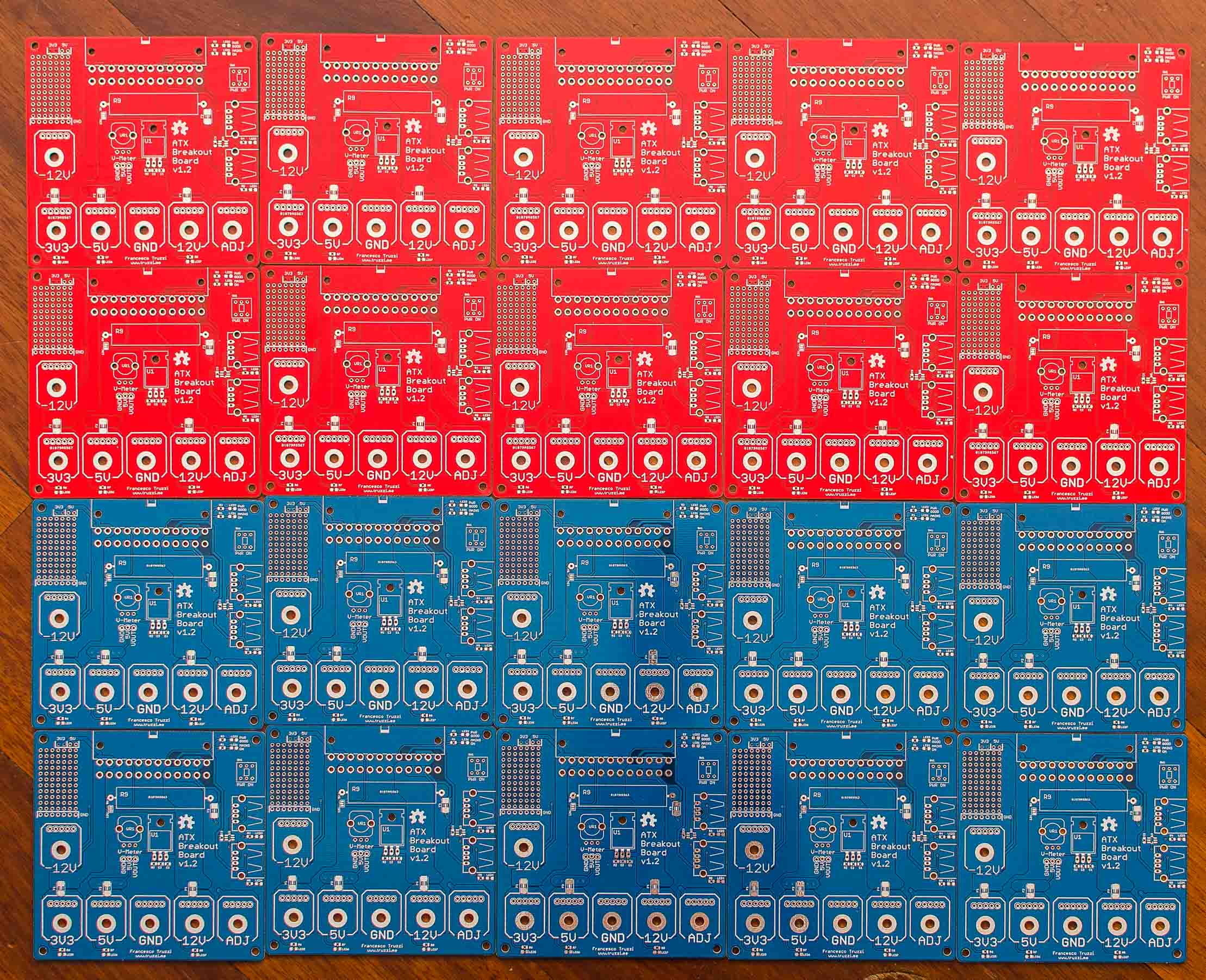
<p>I released a <a href="https://github.com/ftruzzi/ATX-Breakout-Mini">newer version</a> of my <a href="http://www.truzzi.me/building-a-better-breakout-board-for-atx-psus-2/">ATX Breakout Board</a>. After receiving a lot of requests, I also printed some PCBs (10x blue, 10x red) and will print more after thorough testing of the current revision.</p>

<!--more-->

<p>Features and additions added from the older version:</p>

<ul>
  <li>Thickened many traces, <strong>removed pin headers</strong> in the middle of the board and <strong>added one behind each binding post</strong> (up to 5 output pins per voltage line, with no risk of burning any traces).</li>
  <li><strong>Added resistors to the USB ports (on the back of the board).</strong> You may want to use them for USB identification, as they are cheaper and easier to find than the TPS2513. Adafruit link for more info: <a href="https://learn.adafruit.com/minty-boost/icharging">https://learn.adafruit.com/minty-boost/icharging</a></li>
  <li>Moved LM317 so that you can mount it horizontally + used a footprint with longpads, should you want to solder wires to an external voltage reg + heatsink.</li>
  <li><strong>Prototyping area added</strong> at the top left of the board. Not sure if it will ever come useful, but I had some empty space there. You have easy access to the 3V3 and 5V lines.</li>
  <li>Moved/rearranged several parts (pot, switch, LEDs) in order to draw shorter and cleaner traces.</li>
</ul>

<!--more-->

<p>New parts list:</p>

<ul>
  <li><strong>C1, C3</strong>: 0.1uF 0805 SMD capacitors.</li>
  <li><strong>C2</strong>: 1uF 0805 SMD capacitor.</li>
  <li><strong>F1, F2, F3, F4</strong>: 1812 SMD PTC resettable fuses. (Littelfuse ones should work just fine, I used Bourns instead which are a bit larger).</li>
  <li><strong>J1: </strong>24-pin ATX connector.</li>
  <li><strong>JP1, JP2, JP3, JP4, JP5, JP6: </strong>5-pin headers, male or female as you prefer.</li>
  <li><strong>JP7: </strong>3-pin header (voltmeter output).</li>
  <li><strong>LED1, LED2, LED3, LED4, LED5, LED6, LED7</strong>: 0805 SMDs, choose the color you want but make sure to use <a href="http://led.linear1.org/1led.wiz">appropriate resistors</a>. You may not want full brightness and sure enough you don’t want magic smoke.</li>
  <li><strong>R1, R3, R4, R5, R7: </strong>3.3K ohm, 0805.</li>
  <li><strong>R2</strong>: 330 ohm, 0805 (value may change – double check LM317 voltages or <a href="http://www.electronics-lab.com/articles/LM317/">calculate your own</a>).</li>
  <li><strong>R8:</strong> 10k ohm, 0805.</li>
  <li><strong>R9:</strong> 9/10W power resistor, not needed in my case.</li>
  <li><strong>R6</strong>: 1.2k ohm, 0805.</li>
  <li><strong>R10, R15: </strong>43k ohm, 0805.</li>
  <li><strong>R12, R14, R17, R19: </strong>51k ohm, 0805.</li>
  <li><strong>R11, R16:</strong> 75k ohm, 0805.</li>
  <li><strong>T1, T2, T3, T4, T5, T6</strong>: binding posts with 4mm hole. You may want some red ones for the positive lines and a black one for GND.</li>
  <li><strong>U1</strong>: LM-317, through hole.</li>
  <li><strong>U2</strong>: TPS2513 from Texas Instruments. If you don’t have it, install resistors R10-R19 for the same functionality (not both!).</li>
  <li><strong>VR1</strong>: 2k ohm, PCB mount potentiometer, 9mm (<a href="http://www.taydaelectronics.com/potentiometer-variable-resistors/rotary-potentiometer/linear/b2k-ohm-linear-taper-potentiometer-round-knurled-plastic-shaft-pcb-9mm.html">click</a>)</li>
  <li><strong>X1, X2</strong>: USB female connectors, through hole.</li>
  <li><strong>SW1</strong>: 8x8mm pushbutton (got mine from <a href="http://www.taydaelectronics.com/push-button-switch-latching-on-off-dpdt-0-5a-50vdc-8x8mm.html">Tayda</a>.)</li>
</ul>

<p>I bought all of my components from Tayda Electronics, except for the ATX connector and the PTC fuses (check Sparkfun or eBay!)</p>

<p>Time for some pictures:</p>

<figure><a href="/assets/images/DSC_9258.jpg">
  <img src="/generated/assets/images/DSC_9258-800-99566b.jpg" srcset="/generated/assets/images/DSC_9258-400-99566b.jpg 400w, /generated/assets/images/DSC_9258-600-99566b.jpg 600w, /generated/assets/images/DSC_9258-800-99566b.jpg 800w, /generated/assets/images/DSC_9258-1000-99566b.jpg 1000w" sizes="(max-width: 600px) 100vw, (max-width: 900px) 80vw, (max-width: 1200px) 60vw, (max-width: 1800px) 50vw, (min-width: 1801px) 40vw" />
</a>
<figcaption>Sexy, aren't they? Also, colors!</figcaption></figure>

<figure> <a href="/assets/images/DSC_9264.jpg">
  <img src="/generated/assets/images/DSC_9264-800-ee9369.jpg" srcset="/generated/assets/images/DSC_9264-400-ee9369.jpg 400w, /generated/assets/images/DSC_9264-600-ee9369.jpg 600w, /generated/assets/images/DSC_9264-800-ee9369.jpg 800w, /generated/assets/images/DSC_9264-1000-ee9369.jpg 1000w" sizes="(max-width: 600px) 100vw, (max-width: 900px) 80vw, (max-width: 1200px) 60vw, (max-width: 1800px) 50vw, (min-width: 1801px) 40vw" />
</a>
 <figcaption>The whole batch.</figcaption></figure>

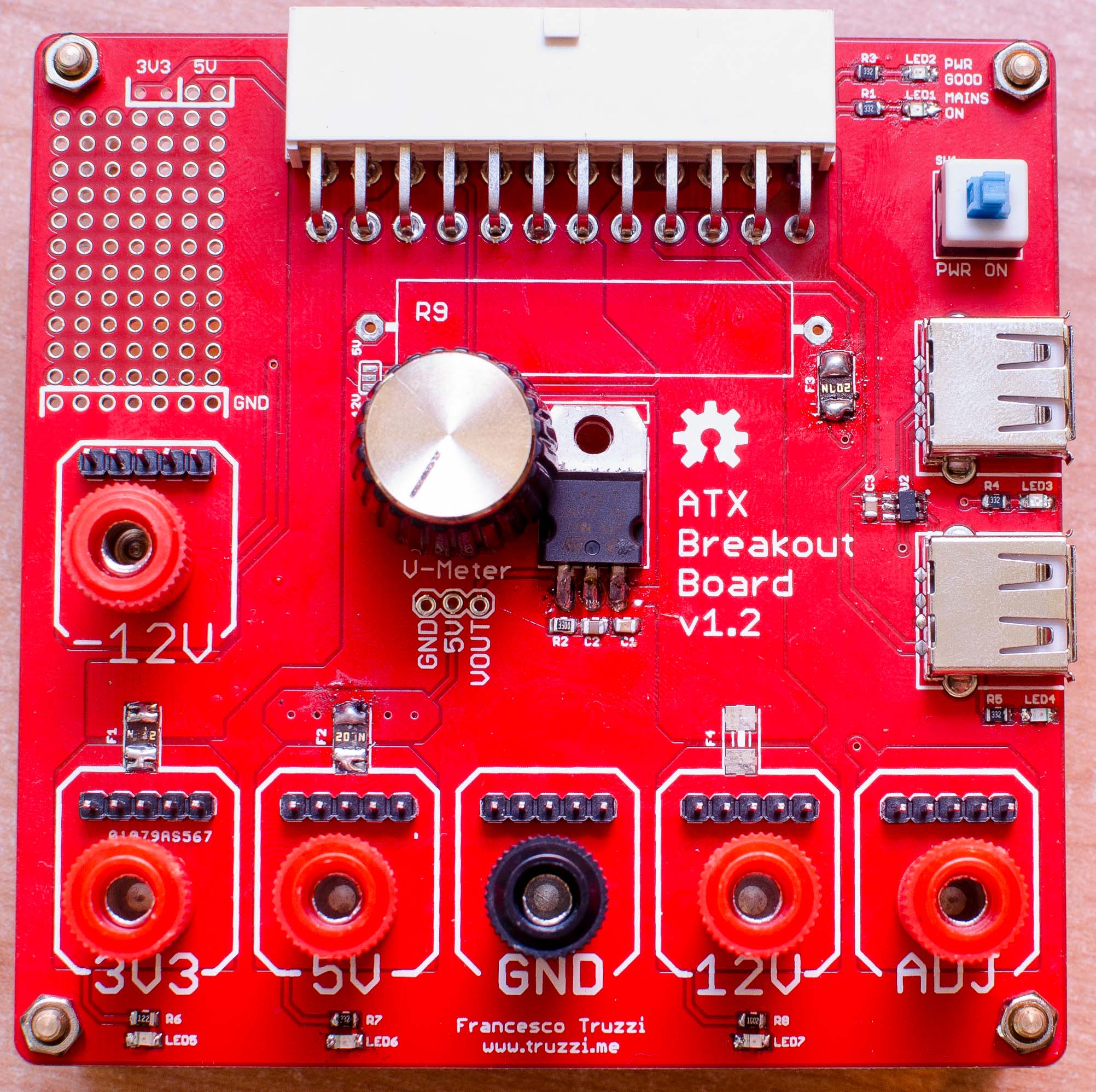
<p>And here’s a fully assembled one (terrible soldering on fuses and LM317 because I recycled them from a previous build):</p>

<figure> <a href="/assets/images/DSC_9282.jpg">
  <img src="/generated/assets/images/DSC_9282-800-b62c37.jpg" srcset="/generated/assets/images/DSC_9282-400-b62c37.jpg 400w, /generated/assets/images/DSC_9282-600-b62c37.jpg 600w, /generated/assets/images/DSC_9282-800-b62c37.jpg 800w, /generated/assets/images/DSC_9282-1000-b62c37.jpg 1000w" sizes="(max-width: 600px) 100vw, (max-width: 900px) 80vw, (max-width: 1200px) 60vw, (max-width: 1800px) 50vw, (min-width: 1801px) 40vw" />
</a>
 <figcaption>An assembled board.</figcaption></figure>

<p>PCBs will be available in the <a href="http://www.truzzi.me/product/atx-breakout-board-pcb-only/">store</a> and on Tindie soon.</p>

<p>Cheers!</p>]]></content><author><name>{&quot;avatar&quot;=&gt;&quot;/assets/images/self.jpg&quot;, &quot;bio&quot;=&gt;&quot;Software Engineer&quot;, &quot;location&quot;=&gt;&quot;Milan, Italy&quot;, &quot;email&quot;=&gt;&quot;francesco@truzzi.me&quot;, &quot;uri&quot;=&gt;nil, &quot;home&quot;=&gt;nil, &quot;bitbucket&quot;=&gt;nil, &quot;codepen&quot;=&gt;nil, &quot;dribbble&quot;=&gt;nil, &quot;flickr&quot;=&gt;nil, &quot;facebook&quot;=&gt;nil, &quot;foursquare&quot;=&gt;nil, &quot;github&quot;=&gt;&quot;ftruzzi&quot;, &quot;gitlab&quot;=&gt;nil, &quot;google_plus&quot;=&gt;nil, &quot;keybase&quot;=&gt;nil, &quot;instagram&quot;=&gt;nil, &quot;lastfm&quot;=&gt;nil, &quot;linkedin&quot;=&gt;&quot;ftruzzi&quot;, &quot;pinterest&quot;=&gt;nil, &quot;soundcloud&quot;=&gt;nil, &quot;stackoverflow&quot;=&gt;nil, &quot;steam&quot;=&gt;nil, &quot;tumblr&quot;=&gt;nil, &quot;twitter&quot;=&gt;&quot;ftruzzi&quot;, &quot;vine&quot;=&gt;nil, &quot;weibo&quot;=&gt;nil, &quot;xing&quot;=&gt;nil, &quot;youtube&quot;=&gt;nil}</name><email>francesco@truzzi.me</email></author><category term="electronics" /><category term="atx" /><category term="breakout" /><category term="electronics" /><category term="pcb" /><category term="pcbs" /><summary type="html"><![CDATA[Hello everyone, I’ve got some good news today! I released a newer version of my ATX Breakout Board. After receiving a lot of requests, I also printed some PCBs (10x blue, 10x red) and will print more after thorough testing of the current revision.]]></summary></entry><entry><title type="html">NodeMCU library for the TI HDC1000 sensor!</title><link href="https://truzzi.me/nodemcu-library-for-the-ti-hdc1000-sensor/" rel="alternate" type="text/html" title="NodeMCU library for the TI HDC1000 sensor!" /><published>2015-03-12T23:19:37+00:00</published><updated>2015-03-12T23:19:37+00:00</updated><id>https://truzzi.me/nodemcu-library-for-the-ti-hdc1000-sensor</id><content type="html" xml:base="https://truzzi.me/nodemcu-library-for-the-ti-hdc1000-sensor/"><![CDATA[<p>It’s been a while since I received my NodeMCU development board but I have only been able to get my hands on it lately.</p>

<p>I soon downloaded the ESP uploader and after reading some Lua docs (and finding out some weird things such as that the “not equal” operator is actually “~=” ) I started writing my own code for the board.</p>

<p>Writing and uploading software to the board is easy and fast. The only concern is that after flashing the NoceMCU firmware you are not left with a lot of memory available.</p>

<p>So I wrote a NodeMCU library (they call them <em>modules</em>) for the TI HDC1000. The code has been merged to the dev branch of the nodemcu firmware and it should go to the master soon, but I’ve set up a repo too (<a href="https://github.com/ftruzzi/HDC1000-NodeMCU">click!</a>).
<!--more--></p>

<h3 id="download-and-upload-the-library">Download and upload the library</h3>

<p>Click <a href="https://github.com/ftruzzi/HDC1000-NodeMCU/archive/master.zip">here</a> to download the latest library.</p>

<p>You then need to connect to your ESP8266 dev board and upload the “HDC1000.lua” file to it. This is pretty straightforward using <a href="http://esp8266.ru/esplorer/">ESPlorer</a>.</p>

<figure><a href="/assets/images/2015-03-12_22-45-41.png">
  <img src="/generated/assets/images/2015-03-12_22-45-41-800-b4b5d7.png" srcset="/generated/assets/images/2015-03-12_22-45-41-400-b4b5d7.png 400w, /generated/assets/images/2015-03-12_22-45-41-600-b4b5d7.png 600w, /generated/assets/images/2015-03-12_22-45-41-800-b4b5d7.png 800w, /generated/assets/images/2015-03-12_22-45-41-1000-b4b5d7.png 1000w" sizes="(max-width: 600px) 100vw, (max-width: 900px) 80vw, (max-width: 1200px) 60vw, (max-width: 1800px) 50vw, (min-width: 1801px) 40vw" />
</a>
<figcaption>After connecting to your board, upload the “HDC1000.lua” file.</figcaption></figure>

<h3 id="setup-your-sensor">Setup your sensor</h3>

<p>First, require it:</p>

<div class="language-lua highlighter-rouge"><div class="highlight"><pre class="highlight"><code><span class="n">HDC1000</span> <span class="o">=</span> <span class="nb">require</span><span class="p">(</span><span class="s2">"HDC1000"</span><span class="p">)</span>
</code></pre></div></div>

<p>Then, initialize it:</p>

<div class="language-lua highlighter-rouge"><div class="highlight"><pre class="highlight"><code><span class="n">HDC1000</span><span class="p">.</span><span class="n">init</span><span class="p">(</span><span class="n">sda</span><span class="p">,</span> <span class="n">scl</span><span class="p">,</span> <span class="n">drdyn</span><span class="p">)</span>
</code></pre></div></div>

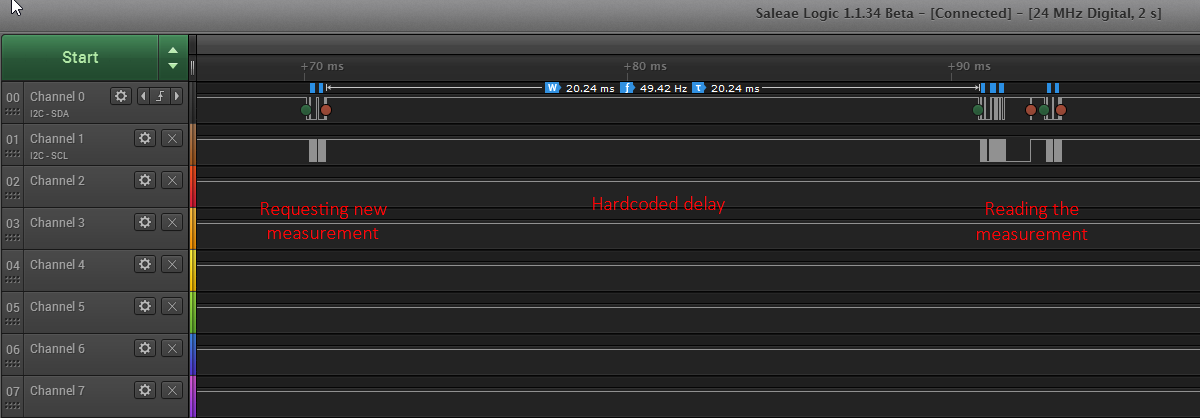
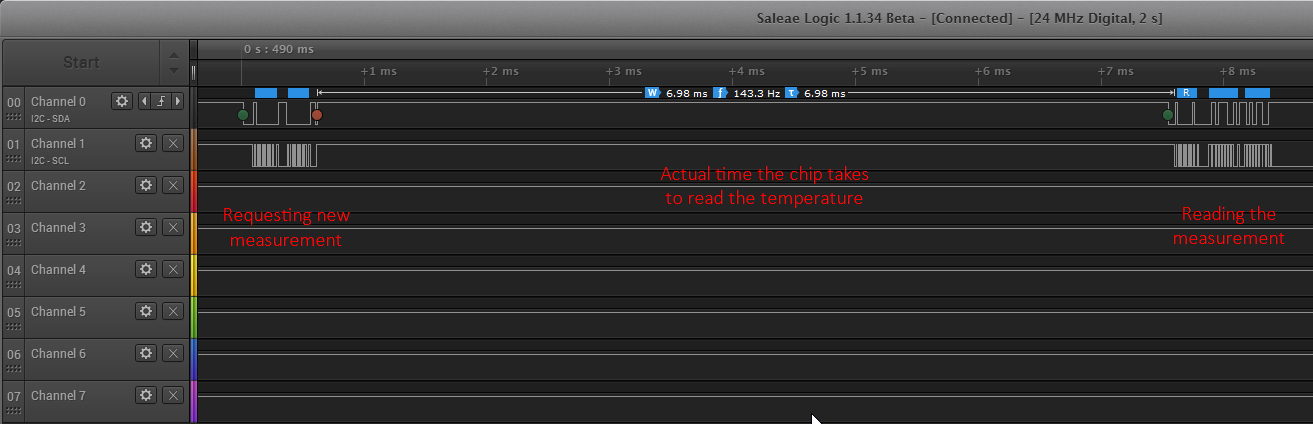
<p>If you don’t want to use the DRDYn pin, set it to false: a 20ms delay will be automatically set after each read request.</p>

<div class="language-lua highlighter-rouge"><div class="highlight"><pre class="highlight"><code><span class="n">HDC1000</span><span class="p">.</span><span class="n">init</span><span class="p">(</span><span class="n">sda</span><span class="p">,</span> <span class="n">scl</span><span class="p">,</span> <span class="kc">false</span><span class="p">)</span>
</code></pre></div></div>

<figure><a href="/assets/images/2015-03-12_23-03-54.png">
  <img src="/generated/assets/images/2015-03-12_23-03-54-800-06ee59.png" srcset="/generated/assets/images/2015-03-12_23-03-54-400-06ee59.png 400w, /generated/assets/images/2015-03-12_23-03-54-600-06ee59.png 600w, /generated/assets/images/2015-03-12_23-03-54-800-06ee59.png 800w, /generated/assets/images/2015-03-12_23-03-54-1000-06ee59.png 1000w" sizes="(max-width: 600px) 100vw, (max-width: 900px) 80vw, (max-width: 1200px) 60vw, (max-width: 1800px) 50vw, (min-width: 1801px) 40vw" />
</a>
<figcaption>Reading temperature with the DRDYn pin off.</figcaption></figure>

<figure><a href="/assets/images/2015-03-12_23-11-05.png">
  <img src="/generated/assets/images/2015-03-12_23-11-05-800-d9332e.png" srcset="/generated/assets/images/2015-03-12_23-11-05-400-d9332e.png 400w, /generated/assets/images/2015-03-12_23-11-05-600-d9332e.png 600w, /generated/assets/images/2015-03-12_23-11-05-800-d9332e.png 800w, /generated/assets/images/2015-03-12_23-11-05-1000-d9332e.png 1000w" sizes="(max-width: 600px) 100vw, (max-width: 900px) 80vw, (max-width: 1200px) 60vw, (max-width: 1800px) 50vw, (min-width: 1801px) 40vw" />
</a>
<figcaption>Reading temperature with the DRDYn pin on.</figcaption></figure>

<p>Configure it:</p>

<div class="language-lua highlighter-rouge"><div class="highlight"><pre class="highlight"><code><span class="n">HDC1000</span><span class="p">.</span><span class="n">config</span><span class="p">()</span>
</code></pre></div></div>

<p>Default options set the address to 0x40 and enable both temperature and humidity readings at 14-bit resolution, with the integrated heater on. You can change them by initializing your sensor like this:</p>

<div class="language-lua highlighter-rouge"><div class="highlight"><pre class="highlight"><code><span class="n">HDC1000</span><span class="p">.</span><span class="n">config</span><span class="p">(</span><span class="n">address</span><span class="p">,</span> <span class="n">resolution</span><span class="p">,</span> <span class="n">heater</span><span class="p">);</span>
</code></pre></div></div>

<p>“resolution” can be set to 14 bits for both temperature and humidity (0x00 – default) 11 bits for temperature (0x40), 11 bits for humidity (0x01), 8 bits for humidity (0x20) “heater” can be set to ON (0x20 – default) or OFF (0x00)</p>

<h3 id="read-some-values">Read some values</h3>

<p>You can read temperature and humidity by using the following commands:</p>

<div class="language-lua highlighter-rouge"><div class="highlight"><pre class="highlight"><code><span class="n">temperature</span> <span class="o">=</span> <span class="n">HDC1000</span><span class="p">.</span><span class="n">getTemp</span><span class="p">()</span>
</code></pre></div></div>

<p>in Celsius degrees.</p>

<div class="language-lua highlighter-rouge"><div class="highlight"><pre class="highlight"><code><span class="n">humidity</span> <span class="o">=</span> <span class="n">HDC1000</span><span class="p">.</span><span class="n">getHumi</span><span class="p">()</span>
</code></pre></div></div>

<p>in %RH.</p>

<h3 id="check-your-battery">Check your battery</h3>

<p>The following code returns true if the battery voltage is &lt;2.8V, false otherwise.</p>

<div class="language-lua highlighter-rouge"><div class="highlight"><pre class="highlight"><code><span class="n">isDead</span> <span class="o">=</span> <span class="n">HDC1000</span><span class="p">.</span><span class="n">batteryDead</span><span class="p">();</span>
</code></pre></div></div>

<h3 id="complete-example-code">Complete example code</h3>

<div class="language-lua highlighter-rouge"><div class="highlight"><pre class="highlight"><code><span class="n">HDC1000</span> <span class="o">=</span> <span class="nb">require</span><span class="p">(</span><span class="s2">"HDC1000"</span><span class="p">)</span>

<span class="n">sda</span> <span class="o">=</span> <span class="mi">1</span>
<span class="n">scl</span> <span class="o">=</span> <span class="mi">2</span>
<span class="n">drdyn</span> <span class="o">=</span> <span class="kc">false</span>

<span class="n">HDC1000</span><span class="p">.</span><span class="n">init</span><span class="p">(</span><span class="n">sda</span><span class="p">,</span> <span class="n">scl</span><span class="p">,</span> <span class="n">drdyn</span><span class="p">)</span>
<span class="n">HDC1000</span><span class="p">.</span><span class="n">config</span><span class="p">()</span> <span class="c1">-- default values are used if called with no arguments. prototype is config(address, resolution, heater)</span>

<span class="nb">print</span><span class="p">(</span><span class="nb">string.format</span><span class="p">(</span><span class="s2">"Temperature: %.2f °C\nHumidity: %.2f %%"</span><span class="p">,</span> <span class="n">HDC1000</span><span class="p">.</span><span class="n">getTemp</span><span class="p">(),</span> <span class="n">HDC1000</span><span class="p">.</span><span class="n">getHumi</span><span class="p">()))</span>

<span class="n">HDC1000</span> <span class="o">=</span> <span class="kc">nil</span>
<span class="nb">package.loaded</span><span class="p">[</span><span class="s2">"HDC1000"</span><span class="p">]</span><span class="o">=</span><span class="kc">nil</span>

</code></pre></div></div>]]></content><author><name>{&quot;avatar&quot;=&gt;&quot;/assets/images/self.jpg&quot;, &quot;bio&quot;=&gt;&quot;Software Engineer&quot;, &quot;location&quot;=&gt;&quot;Milan, Italy&quot;, &quot;email&quot;=&gt;&quot;francesco@truzzi.me&quot;, &quot;uri&quot;=&gt;nil, &quot;home&quot;=&gt;nil, &quot;bitbucket&quot;=&gt;nil, &quot;codepen&quot;=&gt;nil, &quot;dribbble&quot;=&gt;nil, &quot;flickr&quot;=&gt;nil, &quot;facebook&quot;=&gt;nil, &quot;foursquare&quot;=&gt;nil, &quot;github&quot;=&gt;&quot;ftruzzi&quot;, &quot;gitlab&quot;=&gt;nil, &quot;google_plus&quot;=&gt;nil, &quot;keybase&quot;=&gt;nil, &quot;instagram&quot;=&gt;nil, &quot;lastfm&quot;=&gt;nil, &quot;linkedin&quot;=&gt;&quot;ftruzzi&quot;, &quot;pinterest&quot;=&gt;nil, &quot;soundcloud&quot;=&gt;nil, &quot;stackoverflow&quot;=&gt;nil, &quot;steam&quot;=&gt;nil, &quot;tumblr&quot;=&gt;nil, &quot;twitter&quot;=&gt;&quot;ftruzzi&quot;, &quot;vine&quot;=&gt;nil, &quot;weibo&quot;=&gt;nil, &quot;xing&quot;=&gt;nil, &quot;youtube&quot;=&gt;nil}</name><email>francesco@truzzi.me</email></author><category term="electronics" /><category term="esp8266" /><category term="nodemcu" /><summary type="html"><![CDATA[It’s been a while since I received my NodeMCU development board but I have only been able to get my hands on it lately. I soon downloaded the ESP uploader and after reading some Lua docs (and finding out some weird things such as that the “not equal” operator is actually “~=” ) I started writing my own code for the board. Writing and uploading software to the board is easy and fast. The only concern is that after flashing the NoceMCU firmware you are not left with a lot of memory available. So I wrote a NodeMCU library (they call them modules) for the TI HDC1000. The code has been merged to the dev branch of the nodemcu firmware and it should go to the master soon, but I’ve set up a repo too (click!).]]></summary></entry><entry><title type="html">HDC1000 temperature and humidity sensor breakout, with Arduino library!</title><link href="https://truzzi.me/hdc1000-temperature-and-humidity-sensor-breakout-with-arduino-library/" rel="alternate" type="text/html" title="HDC1000 temperature and humidity sensor breakout, with Arduino library!" /><published>2015-02-24T11:42:23+00:00</published><updated>2015-02-24T11:42:23+00:00</updated><id>https://truzzi.me/hdc1000-temperature-and-humidity-sensor-breakout-with-arduino-library</id><content type="html" xml:base="https://truzzi.me/hdc1000-temperature-and-humidity-sensor-breakout-with-arduino-library/"><![CDATA[<p>Some time ago I came across a new chip from TI, the <a href="http://www.ti.com/product/hdc1000" target="_blank">HDC1000</a>. It’s a <strong>temperature and humidity sensor</strong> with I2C interface and requires little to no additional components. It comes in an 8BGA package: we can all agree it’s pretty small.</p>

<p>Some of the peculiar characteristics of this chip are that it has a DRDYn pin which goes low any time there is a new reading from the chip (so you can precisely time your requests) and that the sensor is located on the bottom of the IC, so that it’s not exposed to dust and other agents that may false the readings. Also, it has an <strong>integrated heater</strong> that can remove humidity from the sensor.</p>

<p>So I developed a very small breakout board for this chip as well as an Arduino library (yay, my first one! raspberryPi and nodemcu might come next).</p>

<h2 id="the-breakout-boards">The breakout boards.</h2>

<p>I learned quite a lot about PCB design and soldering, effectively putting my new hot air station to good use.</p>

<figure><a href="/assets/images/image.png">
  <img src="/generated/assets/images/image-570-309148.png" srcset="/generated/assets/images/image-400-309148.png 400w, /generated/assets/images/image-570-309148.png 570w" sizes="(max-width: 600px) 100vw, (max-width: 900px) 80vw, (max-width: 1200px) 60vw, (max-width: 1800px) 50vw, (min-width: 1801px) 40vw" />
</a>
<figcaption>Board layout.</figcaption></figure>

<p>The boards were again fulfilled by <a href="http://www.dirtypcbs.com" target="_blank">DirtyPCBs</a>, perfect for this kind of small projects.</p>

<p>So here are the pictures of my board…</p>

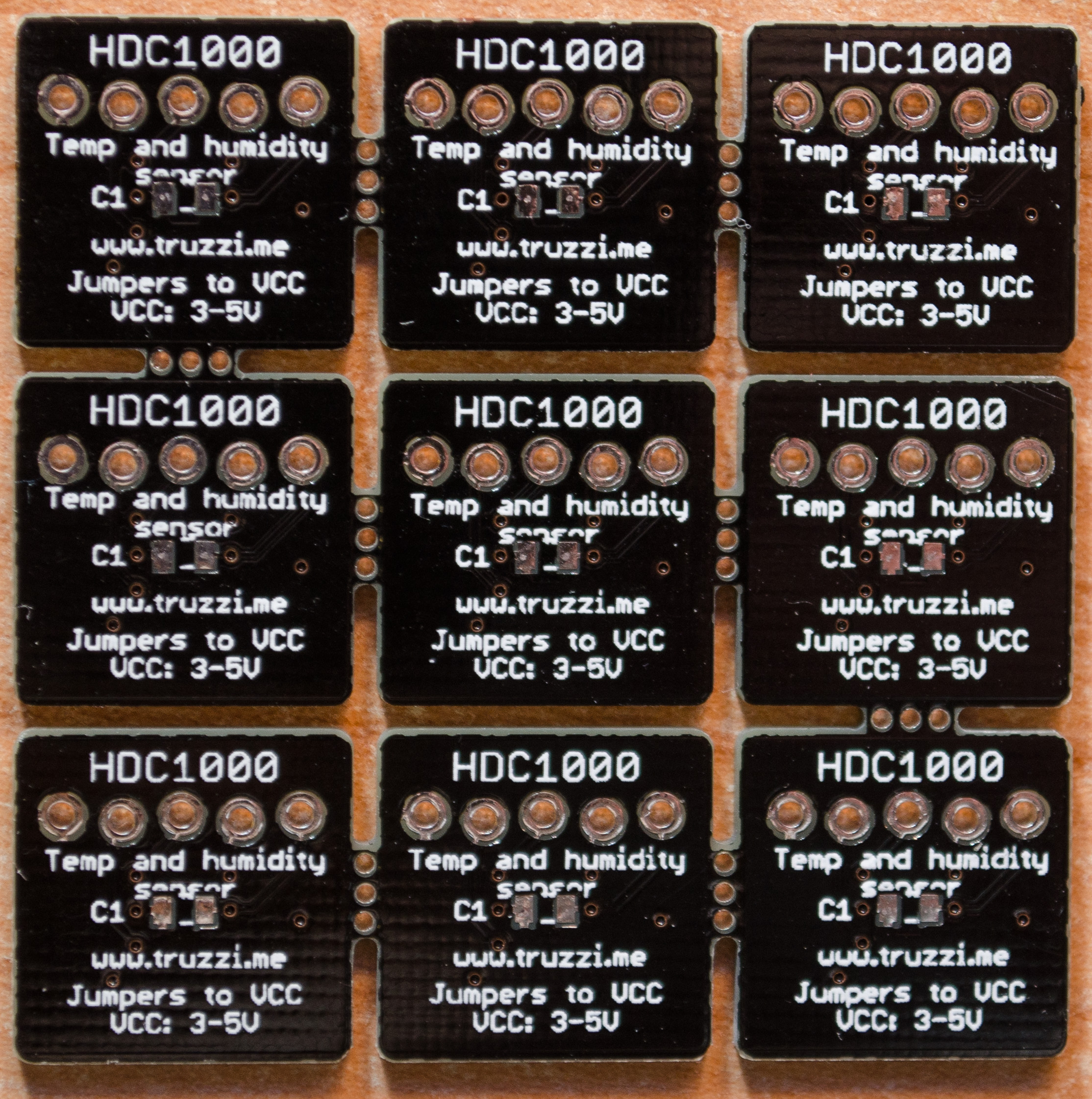
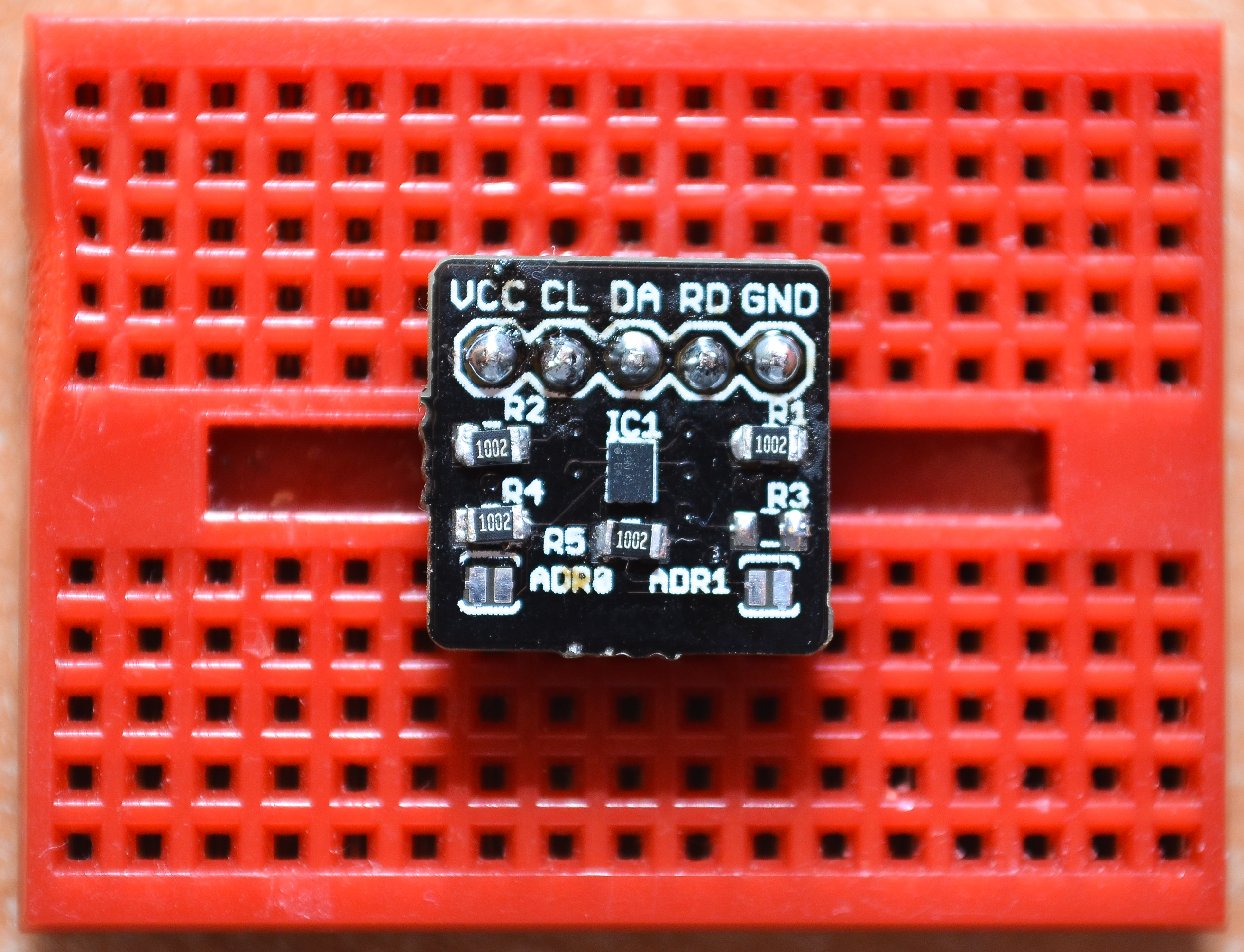
<figure><a href="/assets/images/DSC_5856.jpg">
  <img src="/generated/assets/images/DSC_5856-800-beca1f.jpg" srcset="/generated/assets/images/DSC_5856-400-beca1f.jpg 400w, /generated/assets/images/DSC_5856-600-beca1f.jpg 600w, /generated/assets/images/DSC_5856-800-beca1f.jpg 800w, /generated/assets/images/DSC_5856-1000-beca1f.jpg 1000w" sizes="(max-width: 600px) 100vw, (max-width: 900px) 80vw, (max-width: 1200px) 60vw, (max-width: 1800px) 50vw, (min-width: 1801px) 40vw" />
</a>
<figcaption>Front view.</figcaption></figure>

<figure><a href="/assets/images/DSC_5857.jpg">
  <img src="/generated/assets/images/DSC_5857-800-facf59.jpg" srcset="/generated/assets/images/DSC_5857-400-facf59.jpg 400w, /generated/assets/images/DSC_5857-600-facf59.jpg 600w, /generated/assets/images/DSC_5857-800-facf59.jpg 800w, /generated/assets/images/DSC_5857-1000-facf59.jpg 1000w" sizes="(max-width: 600px) 100vw, (max-width: 900px) 80vw, (max-width: 1200px) 60vw, (max-width: 1800px) 50vw, (min-width: 1801px) 40vw" />
</a>
<figcaption>Back view.</figcaption></figure>

<figure><a href="/assets/images/DSC_5869.jpg">
  <img src="/generated/assets/images/DSC_5869-800-443c0a.jpg" srcset="/generated/assets/images/DSC_5869-400-443c0a.jpg 400w, /generated/assets/images/DSC_5869-600-443c0a.jpg 600w, /generated/assets/images/DSC_5869-800-443c0a.jpg 800w, /generated/assets/images/DSC_5869-1000-443c0a.jpg 1000w" sizes="(max-width: 600px) 100vw, (max-width: 900px) 80vw, (max-width: 1200px) 60vw, (max-width: 1800px) 50vw, (min-width: 1801px) 40vw" />
</a>
<figcaption>Soldered and dirty.</figcaption></figure>

<p>..and here are the features:</p>

<ul>
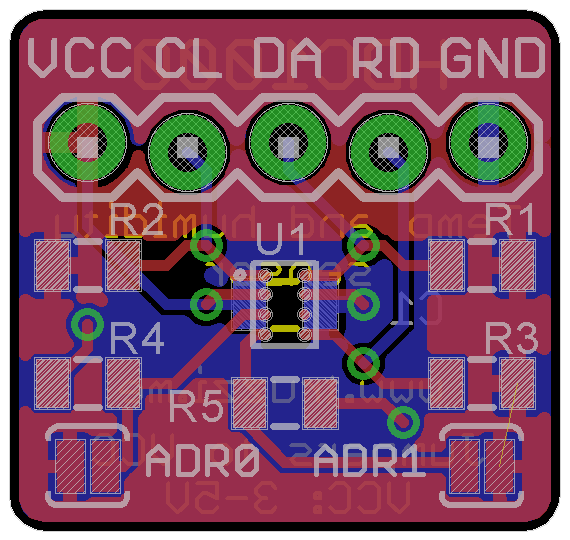
  <li><strong>Address selection</strong> jumpers: ADR0 and ADR1 are tied to GND by default but you can jump them to VCC in order to change the address of your sensor (<strong>default:0x40</strong>).</li>
  <li><strong>I2C pull-ups</strong> to VCC for SDA, SCL and DRDYn. If you don’t want to use the latter, just don’t solder the resistor and leave it floating.</li>
  <li>3-5V input, logic <strong>5V tolerant</strong> (3.3V recommended).</li>
</ul>

<p>Parts list:</p>

<ul>
  <li><strong>IC1</strong>: HDC1000 sensor, you can’t really go wrong with the package since, sadly, it’s the only one.</li>
  <li><strong>R1,R2:</strong> 4.7k-10k ohm, 0805 package. I2C pull-up resistors.</li>
  <li><strong>R3:</strong> 10k ohm, 0805 package. Pull-up resistor to VCC, for the DRDYN pin. Leave the pin floating if not used.</li>
  <li><strong>R4, R5:</strong> 10k ohm, pull-down resistors to GND for address selection.</li>
  <li><strong>C1</strong>: 0.1uF cap, 0805 package.</li>
  <li><strong>JP1</strong>: 0.1″, 5-pin headers.</li>
</ul>

<p>The board is 1.6×1.6 centimeters, and soldering that BGA chip (1.6×2 <em>millimeters</em>) wasn’t really that hard! I actually struggled more with the resistors, maybe because I used my ugly and huge 60W iron.</p>

<p>Here’s what I found works best:</p>

<ol>
  <li>Solder the components in this order: resistors, IC, capacitor (on the back of the board), pin headers. If you do it any other way you will have trouble balancing the board, I found it the hard way.</li>
  <li>Apply a small quantity of flux on the pads (not on the middle of them, as it’s where the sensor lies..) – I used a flux pen.</li>
  <li>Place the IC on the pads without pre-tinning anything, and fire up your heatgun.</li>
  <li>If you aligned the chip correctly it will begin to stick to the pads by itself and you shouldn’t have to touch it anymore.</li>
</ol>

<p>Of course you can do this with a reflow oven but using an hot-air gun it took me less than 3 minutes, for just the IC. You <strong>can’t</strong> solder this with a regular iron.</p>

<p><strong>Note: the breakout boards should also be compatible with the HDC1008, but I haven’t tested it yet.</strong></p>

<p>Now the best part…</p>

<h2 id="the-arduino-library">The Arduino library.</h2>

<p>Yesterday was a firsts day! (is this even remotely correct?) I soldered my first BGA and wrote my first Arduino library. I don’t think it’s quality code (there could be a lot to improve – should you feel compelled to do so, it’s on <a href="https://github.com/ftruzzi/HDC1000-Arduino" target="_blank">Github</a>) but I tried to learn from both tutorials on the Arduino website and other libraries written by Ladyada and Seeedstudio.</p>

<p>How it works:</p>

<p>Just download <a href="https://github.com/ftruzzi/HDC1000-Arduino/archive/master.zip" target="_blank">(click!</a>) and #include the library, declare your HDC1000 object and call the begin() function.</p>

<div class="language-c++ highlighter-rouge"><div class="highlight"><pre class="highlight"><code><span class="cp">#include</span> <span class="cpf">&lt;Wire.h&gt;</span><span class="cp">
#include</span> <span class="cpf">&lt;HDC1000.h&gt;</span><span class="cp">
</span>
<span class="n">HDC1000</span> <span class="n">mySensor</span><span class="p">;</span>


<span class="kt">void</span> <span class="nf">setup</span><span class="p">(){</span>
    <span class="n">mySensor</span><span class="p">.</span><span class="n">begin</span><span class="p">();</span>
<span class="p">}</span>
</code></pre></div></div>

<p>By default, the library is configured to enable both temperature and humidity readings, at <strong>14-bit resolution</strong>, with the heater on. Also, the default address is <strong>0x40</strong>. Should you want to change these features, you can declare your object like this (all the possible options are in the .h file – also check out the <a href="http://www.ti.com/lit/ds/snas643a/snas643a.pdf" target="_blank">datasheet</a>):</p>

<p><strong>UPDATE 07/03/15: You can now use the DRDYn pin, which is pulled low by the chip itself when a new measurement is ready. It is off by default (drdyn_pin is set to -1).</strong></p>

<div class="language-c++ highlighter-rouge"><div class="highlight"><pre class="highlight"><code><span class="n">HDC1000</span> <span class="nf">mySensor</span><span class="p">(</span><span class="n">addr</span><span class="p">,</span> <span class="n">drdyn_pin</span><span class="p">);</span>

<span class="kt">void</span> <span class="nf">setup</span><span class="p">(){</span>
    <span class="n">mySensor</span><span class="p">.</span><span class="n">begin</span><span class="p">(</span><span class="n">HDC1000_BOTH_TEMP_HUMI</span><span class="p">,</span> <span class="n">HDC1000_TEMP_11BIT</span><span class="p">,</span> <span class="n">HDC1000_HEAT_OFF</span><span class="p">);</span>
<span class="p">}</span>
</code></pre></div></div>

<p>By default, the sensor outputs temperature and humidity readings in a 14-bit format. Fortunately, the library automagically converts them into Celsius degrees (sorry, Americans!) and %. You can access them like this:</p>

<div class="language-c++ highlighter-rouge"><div class="highlight"><pre class="highlight"><code><span class="kt">double</span> <span class="n">temperature</span> <span class="o">=</span> <span class="n">mySensor</span><span class="p">.</span><span class="n">getTemp</span><span class="p">();</span>
<span class="kt">double</span> <span class="n">humidity</span> <span class="o">=</span> <span class="n">mySensor</span><span class="p">.</span><span class="n">getHumi</span><span class="p">();</span>
</code></pre></div></div>

<p>You can also access raw values using the getRawTemp() and getRawHumi() methods (which return uint16_t values).</p>

<p>One nifty feature of the HDC1000 is that it can detect if the battery that’s powering it is nearly flat.</p>

<div class="language-c++ highlighter-rouge"><div class="highlight"><pre class="highlight"><code><span class="kt">uint8_t</span> <span class="n">dead</span> <span class="o">=</span> <span class="n">mySensor</span><span class="p">.</span><span class="n">battery</span><span class="p">();</span> <span class="c1">//returns 1 if voltage &amp;lt; 2.8V, 0 otherwise.</span>
</code></pre></div></div>

<p>The more tech-savvy of you can also read the registers’ configuration:</p>

<div class="language-c++ highlighter-rouge"><div class="highlight"><pre class="highlight"><code><span class="kt">uint16_t</span> <span class="n">config</span> <span class="o">=</span> <span class="n">mySensor</span><span class="p">.</span><span class="n">readConfig</span><span class="p">();</span> <span class="c1">//returns a 16-bit value: last 8 bits are always zero and leading zeros are not displayed</span>
</code></pre></div></div>

<p>Full, super-basic sketch:</p>

<div class="language-c++ highlighter-rouge"><div class="highlight"><pre class="highlight"><code><span class="cp">#include</span> <span class="cpf">&lt;Wire.h&gt;</span><span class="cp">
#include</span> <span class="cpf">&lt;HDC1000.h&gt;</span><span class="cp">
</span>
<span class="n">HDC1000</span> <span class="n">mySensor</span><span class="p">;</span>
<span class="c1">//HDC1000 mySensor(addr, drdyn_pin) &amp;lt;--- you can change default options if you want.</span>

<span class="kt">void</span> <span class="nf">setup</span><span class="p">(){</span>
  <span class="n">Serial</span><span class="p">.</span><span class="n">begin</span><span class="p">(</span><span class="mi">9600</span><span class="p">);</span>
  <span class="n">mySensor</span><span class="p">.</span><span class="n">begin</span><span class="p">();</span>
<span class="p">}</span>

<span class="kt">void</span> <span class="n">loop</span><span class="p">(){</span>
  <span class="n">Serial</span><span class="p">.</span><span class="n">print</span><span class="p">(</span><span class="s">"Temperature: "</span><span class="p">);</span>     <span class="c1">//too bad the Arduino version of sprintf  </span>
  <span class="n">Serial</span><span class="p">.</span><span class="n">print</span><span class="p">(</span><span class="n">mySensor</span><span class="p">.</span><span class="n">getTemp</span><span class="p">());</span>  <span class="c1">//doesn't support floats,</span>
  <span class="n">Serial</span><span class="p">.</span><span class="n">print</span><span class="p">(</span><span class="s">"C, Humidity: "</span><span class="p">);</span>     <span class="c1">//I hate Serial.print().</span>
  <span class="n">Serial</span><span class="p">.</span><span class="n">print</span><span class="p">(</span><span class="n">mySensor</span><span class="p">.</span><span class="n">getHumi</span><span class="p">());</span>
  <span class="n">Serial</span><span class="p">.</span><span class="n">println</span><span class="p">(</span><span class="s">"%"</span><span class="p">);</span>
  <span class="n">delay</span><span class="p">(</span><span class="mi">1000</span><span class="p">);</span>
<span class="p">}</span>
</code></pre></div></div>

<p><del>Sadly, I haven’t implemented the DRDYn pin yet, so I’m using a 20ms delay before reading the next value.</del> I know that you can get the two readings at once (I send two separate requests to the chip) but I felt that there was no need to add another function to the library since you’d have to call two of them anyway.</p>

<p>As usual, leftovers (PCBs only!) are available in the <a href="http://www.truzzi.me/store/products/" target="_blank">store</a> and on <a href="https://www.tindie.com/stores/ftruzzi/" target="_blank">Tindie</a> as soon as I get them approved. Design files on <a href="https://github.com/ftruzzi/HDC1000_Breakout" target="_blank">Github</a>.</p>

<p>Let me know what you think – happy making!</p>]]></content><author><name>{&quot;avatar&quot;=&gt;&quot;/assets/images/self.jpg&quot;, &quot;bio&quot;=&gt;&quot;Software Engineer&quot;, &quot;location&quot;=&gt;&quot;Milan, Italy&quot;, &quot;email&quot;=&gt;&quot;francesco@truzzi.me&quot;, &quot;uri&quot;=&gt;nil, &quot;home&quot;=&gt;nil, &quot;bitbucket&quot;=&gt;nil, &quot;codepen&quot;=&gt;nil, &quot;dribbble&quot;=&gt;nil, &quot;flickr&quot;=&gt;nil, &quot;facebook&quot;=&gt;nil, &quot;foursquare&quot;=&gt;nil, &quot;github&quot;=&gt;&quot;ftruzzi&quot;, &quot;gitlab&quot;=&gt;nil, &quot;google_plus&quot;=&gt;nil, &quot;keybase&quot;=&gt;nil, &quot;instagram&quot;=&gt;nil, &quot;lastfm&quot;=&gt;nil, &quot;linkedin&quot;=&gt;&quot;ftruzzi&quot;, &quot;pinterest&quot;=&gt;nil, &quot;soundcloud&quot;=&gt;nil, &quot;stackoverflow&quot;=&gt;nil, &quot;steam&quot;=&gt;nil, &quot;tumblr&quot;=&gt;nil, &quot;twitter&quot;=&gt;&quot;ftruzzi&quot;, &quot;vine&quot;=&gt;nil, &quot;weibo&quot;=&gt;nil, &quot;xing&quot;=&gt;nil, &quot;youtube&quot;=&gt;nil}</name><email>francesco@truzzi.me</email></author><category term="electronics" /><category term="arduino" /><category term="breakout" /><category term="hdc1000" /><category term="hdc1008" /><summary type="html"><![CDATA[Some time ago I came across a new chip from TI, the HDC1000. It’s a temperature and humidity sensor with I2C interface and requires little to no additional components. It comes in an 8BGA package: we can all agree it’s pretty small. Some of the peculiar characteristics of this chip are that it has a DRDYn pin which goes low any time there is a new reading from the chip (so you can precisely time your requests) and that the sensor is located on the bottom of the IC, so that it’s not exposed to dust and other agents that may false the readings. Also, it has an integrated heater that can remove humidity from the sensor. So I developed a very small breakout board for this chip as well as an Arduino library (yay, my first one! raspberryPi and nodemcu might come next). The breakout boards. I learned quite a lot about PCB design and soldering, effectively putting my new hot air station to good use. Board layout. The boards were again fulfilled by DirtyPCBs, perfect for this kind of small projects. So here are the pictures of my board… Front view. Back view. Soldered and dirty. ..and here are the features: Address selection jumpers: ADR0 and ADR1 are tied to GND by default but you can jump them to VCC in order to change the address of your sensor (default:0x40). I2C pull-ups to VCC for SDA, SCL and DRDYn. If you don’t want to use the latter, just don’t solder the resistor and leave it floating. 3-5V input, logic 5V tolerant (3.3V recommended). Parts list: IC1: HDC1000 sensor, you can’t really go wrong with the package since, sadly, it’s the only one. R1,R2: 4.7k-10k ohm, 0805 package. I2C pull-up resistors. R3: 10k ohm, 0805 package. Pull-up resistor to VCC, for the DRDYN pin. Leave the pin floating if not used. R4, R5: 10k ohm, pull-down resistors to GND for address selection. C1: 0.1uF cap, 0805 package. JP1: 0.1″, 5-pin headers. The board is 1.6×1.6 centimeters, and soldering that BGA chip (1.6×2 millimeters) wasn’t really that hard! I actually struggled more with the resistors, maybe because I used my ugly and huge 60W iron. Here’s what I found works best: Solder the components in this order: resistors, IC, capacitor (on the back of the board), pin headers. If you do it any other way you will have trouble balancing the board, I found it the hard way. Apply a small quantity of flux on the pads (not on the middle of them, as it’s where the sensor lies..) – I used a flux pen. Place the IC on the pads without pre-tinning anything, and fire up your heatgun. If you aligned the chip correctly it will begin to stick to the pads by itself and you shouldn’t have to touch it anymore. Of course you can do this with a reflow oven but using an hot-air gun it took me less than 3 minutes, for just the IC. You can’t solder this with a regular iron. Note: the breakout boards should also be compatible with the HDC1008, but I haven’t tested it yet. Now the best part… The Arduino library. Yesterday was a firsts day! (is this even remotely correct?) I soldered my first BGA and wrote my first Arduino library. I don’t think it’s quality code (there could be a lot to improve – should you feel compelled to do so, it’s on Github) but I tried to learn from both tutorials on the Arduino website and other libraries written by Ladyada and Seeedstudio. How it works: Just download (click!) and #include the library, declare your HDC1000 object and call the begin() function. #include &lt;Wire.h&gt; #include &lt;HDC1000.h&gt; HDC1000 mySensor; void setup(){ mySensor.begin(); } By default, the library is configured to enable both temperature and humidity readings, at 14-bit resolution, with the heater on. Also, the default address is 0x40. Should you want to change these features, you can declare your object like this (all the possible options are in the .h file – also check out the datasheet): UPDATE 07/03/15: You can now use the DRDYn pin, which is pulled low by the chip itself when a new measurement is ready. It is off by default (drdyn_pin is set to -1). HDC1000 mySensor(addr, drdyn_pin); void setup(){ mySensor.begin(HDC1000_BOTH_TEMP_HUMI, HDC1000_TEMP_11BIT, HDC1000_HEAT_OFF); } By default, the sensor outputs temperature and humidity readings in a 14-bit format. Fortunately, the library automagically converts them into Celsius degrees (sorry, Americans!) and %. You can access them like this: double temperature = mySensor.getTemp(); double humidity = mySensor.getHumi(); You can also access raw values using the getRawTemp() and getRawHumi() methods (which return uint16_t values). One nifty feature of the HDC1000 is that it can detect if the battery that’s powering it is nearly flat. uint8_t dead = mySensor.battery(); //returns 1 if voltage &amp;lt; 2.8V, 0 otherwise. The more tech-savvy of you can also read the registers’ configuration: uint16_t config = mySensor.readConfig(); //returns a 16-bit value: last 8 bits are always zero and leading zeros are not displayed Full, super-basic sketch: #include &lt;Wire.h&gt; #include &lt;HDC1000.h&gt; HDC1000 mySensor; //HDC1000 mySensor(addr, drdyn_pin) &amp;lt;--- you can change default options if you want. void setup(){ Serial.begin(9600); mySensor.begin(); } void loop(){ Serial.print("Temperature: "); //too bad the Arduino version of sprintf Serial.print(mySensor.getTemp()); //doesn't support floats, Serial.print("C, Humidity: "); //I hate Serial.print(). Serial.print(mySensor.getHumi()); Serial.println("%"); delay(1000); } Sadly, I haven’t implemented the DRDYn pin yet, so I’m using a 20ms delay before reading the next value. I know that you can get the two readings at once (I send two separate requests to the chip) but I felt that there was no need to add another function to the library since you’d have to call two of them anyway. As usual, leftovers (PCBs only!) are available in the store and on Tindie as soon as I get them approved. Design files on Github. Let me know what you think – happy making!]]></summary></entry><entry><title type="html">LSF0204 breakout board: a bidirectional, multi-voltage level converter!</title><link href="https://truzzi.me/lsf0204-breakout-board-a-bidirectional-multi-voltage-level-converter/" rel="alternate" type="text/html" title="LSF0204 breakout board: a bidirectional, multi-voltage level converter!" /><published>2015-02-18T13:33:11+00:00</published><updated>2015-02-18T13:33:11+00:00</updated><id>https://truzzi.me/lsf0204-breakout-board-a-bidirectional-multi-voltage-level-converter</id><content type="html" xml:base="https://truzzi.me/lsf0204-breakout-board-a-bidirectional-multi-voltage-level-converter/"><![CDATA[<p>Hello everyone!</p>

<p>I needed a small, fast and reliable multi-voltage level translator (mainly for connecting ESP8266 boards to the Arduino, got tired of resistor networks pretty quickly) so I built a breakout board for TI’s LSF0204(D).</p>

<p>Datasheet and info <a href="http://www.ti.com/product/lsf0204">here</a>.</p>

<p>The LSF0204 is a nice little chip. It can translate up to 4 signals to and from the following values:</p>

<p>1.0 V ↔ 1.8/2.5/3.3/5 V.</p>

<p>1.2 V ↔ 1.8/2.5/3.3/5 V.</p>

<p>1.8 V ↔ 2.5/3.3/5 V.</p>

<p>2.5 V ↔ 3.3/5 V.</p>

<p>3.3 V ↔ 5 V.</p>

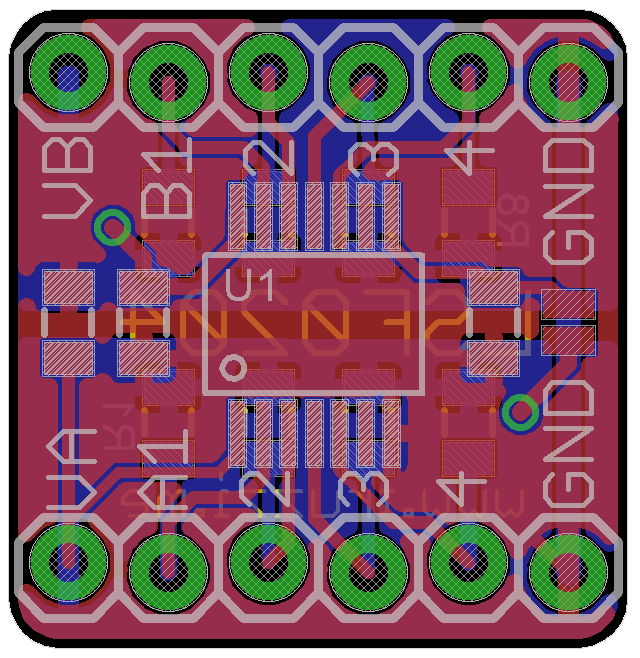
<p>Here’s a picture of the board design:</p>

<figure><a href="/assets/images/lsf0204.jpg">
  <img src="/generated/assets/images/lsf0204-640-52332e.jpg" srcset="/generated/assets/images/lsf0204-400-52332e.jpg 400w, /generated/assets/images/lsf0204-600-52332e.jpg 600w, /generated/assets/images/lsf0204-640-52332e.jpg 640w" sizes="(max-width: 600px) 100vw, (max-width: 900px) 80vw, (max-width: 1200px) 60vw, (max-width: 1800px) 50vw, (min-width: 1801px) 40vw" />
</a>
<figcaption>Board layout.</figcaption></figure>

<p>It’s very easy to use: connect the reference voltages to VA (1.0-4.5V) and VB (1.8-5.5V), and your signals to A1/2/3/4 or B1/2/3/4. It will translate and output them to the opposite A or B pins.</p>

<!--more-->

<h2 id="features-and-parts-list">Features and parts list</h2>

<ul>
  <li>Compatible with both LSF0204 (short jumper) and LSF0204D (solder/short the resistor between the “4” pins).</li>
  <li><strong>Decoupling caps</strong> on both voltage lines.</li>
  <li>Optional <strong>I2C pull-up resistors</strong> (on the back of the board) connected to VA and VB.</li>
  <li>As small as possible! Just <strong>1.6 x 1.6</strong>cm!</li>
</ul>

<p>Parts list:</p>

<ul>
  <li><strong>U1:</strong> LSF0204(D) IC, TSSOP-14 package.</li>
  <li><strong>C1,C2:</strong> 0.1uF 0805 package.</li>
  <li><strong>R1-R8:</strong> 4.7k-10k ohm, 0805 package (I2C pull-ups, optional).</li>
  <li><strong>R9:</strong> 10k ohm, 0805 package. Pull-down resistor to GND, for LSF0204D: the EN pin is active low.</li>
  <li><strong>SJ1:</strong> solder jumper to VA, connect for LSF0204 (non-D): the EN pin is active high.</li>
</ul>

<h2 id="pictures">Pictures!</h2>

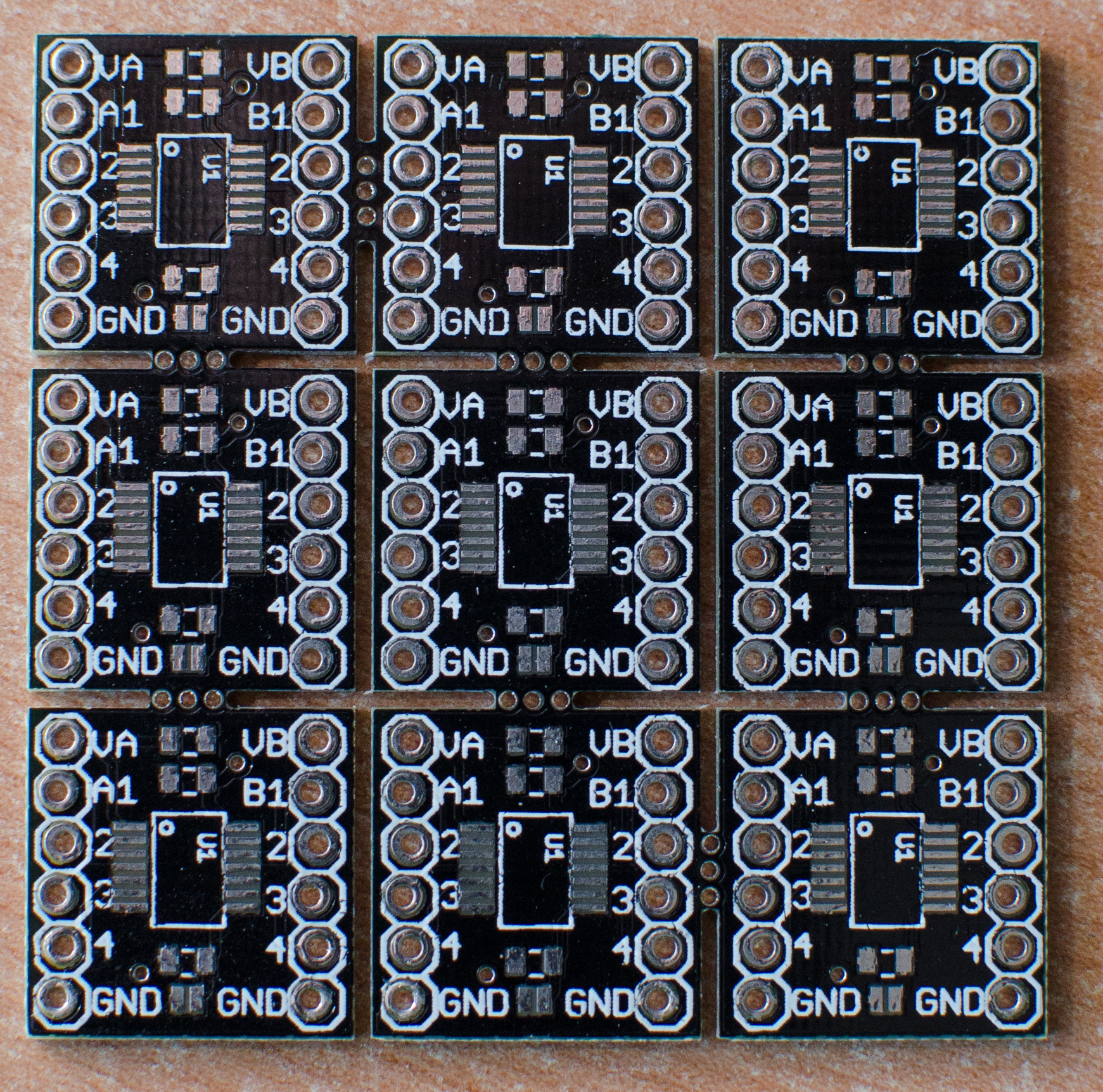
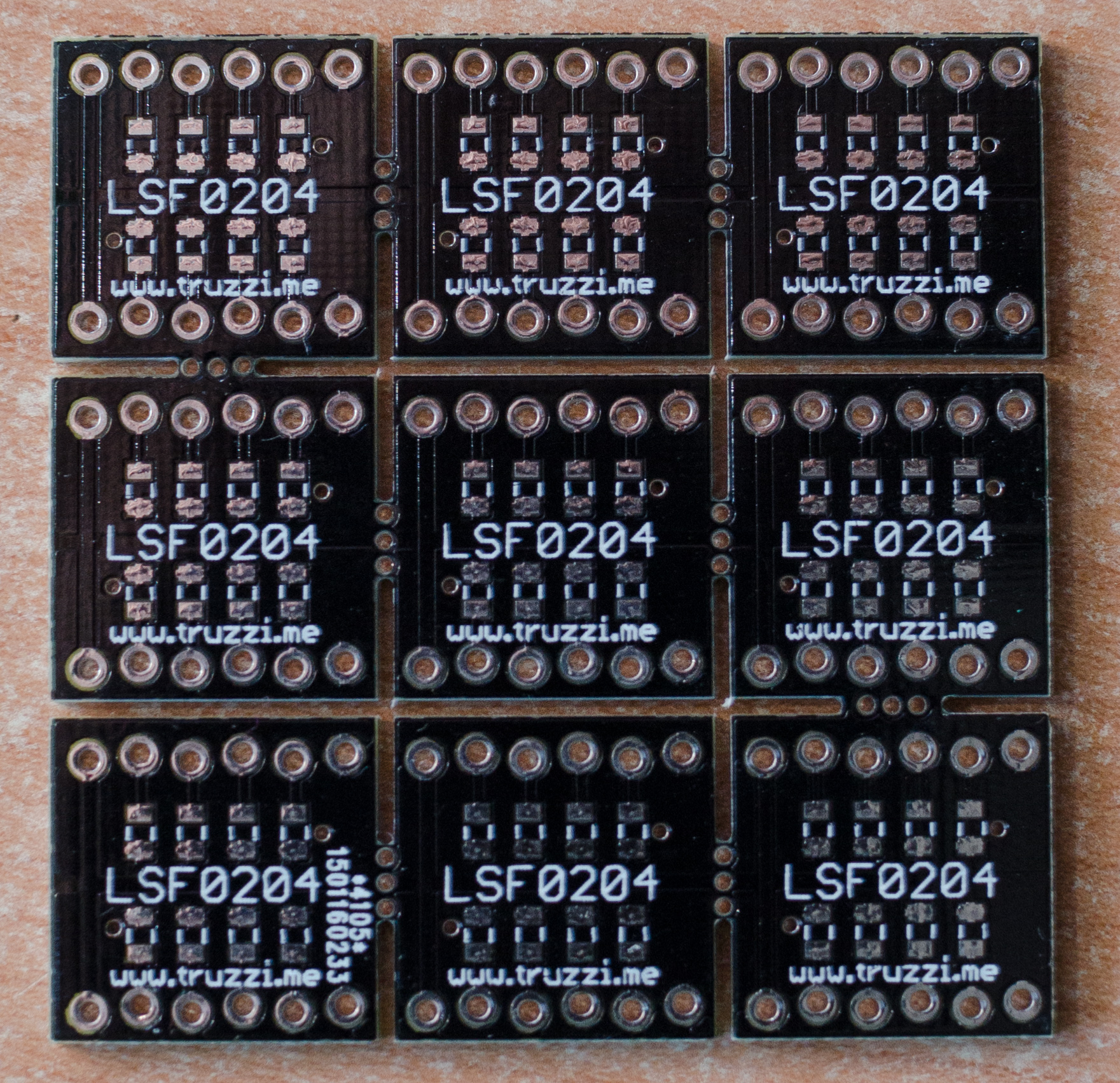
<p>And here’s a couple of picture of some of the boards I received, printed by <a href="www.dirtypcbs.com">DirtyPCBs</a>. Awesome service! Also, the black soldermask rocks.</p>

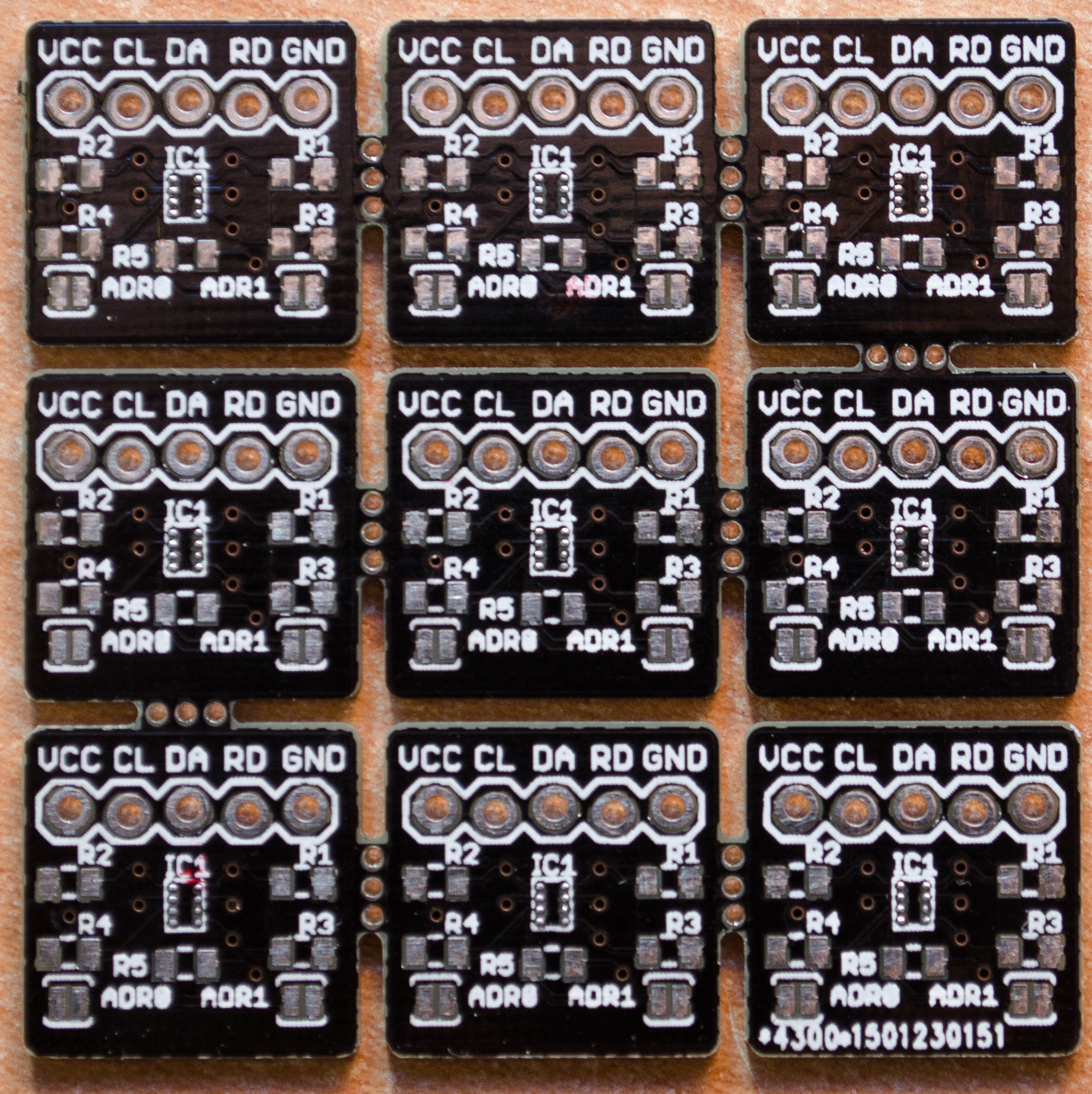
<p>It was also my first try at panelizing and I can say it worked pretty well!</p>

<figure><a href="/assets/images/DSC_5822.jpg">
  <img src="/generated/assets/images/DSC_5822-800-f8f420.jpg" srcset="/generated/assets/images/DSC_5822-400-f8f420.jpg 400w, /generated/assets/images/DSC_5822-600-f8f420.jpg 600w, /generated/assets/images/DSC_5822-800-f8f420.jpg 800w, /generated/assets/images/DSC_5822-1000-f8f420.jpg 1000w" sizes="(max-width: 600px) 100vw, (max-width: 900px) 80vw, (max-width: 1200px) 60vw, (max-width: 1800px) 50vw, (min-width: 1801px) 40vw" />
</a>
<figcaption>Front view.</figcaption></figure>

<figure><a href="/assets/images/DSC_5828.jpg">
  <img src="/generated/assets/images/DSC_5828-800-0b7f52.jpg" srcset="/generated/assets/images/DSC_5828-400-0b7f52.jpg 400w, /generated/assets/images/DSC_5828-600-0b7f52.jpg 600w, /generated/assets/images/DSC_5828-800-0b7f52.jpg 800w, /generated/assets/images/DSC_5828-1000-0b7f52.jpg 1000w" sizes="(max-width: 600px) 100vw, (max-width: 900px) 80vw, (max-width: 1200px) 60vw, (max-width: 1800px) 50vw, (min-width: 1801px) 40vw" />
</a>
<figcaption>Back view.</figcaption></figure>

<p>Here a fully assembled one.  The chip is pretty small but it was easy to solder with the help of a liquid flux pen and my new Yihua-858D hot air station. Don’t worry, you can solder it with a regular iron too!</p>

<figure><a href="/assets/images/IMG-20150218-WA0004-2.jpg">
  <img src="/generated/assets/images/IMG-20150218-WA0004-2-800-8c90d8.jpg" srcset="/generated/assets/images/IMG-20150218-WA0004-2-400-8c90d8.jpg 400w, /generated/assets/images/IMG-20150218-WA0004-2-600-8c90d8.jpg 600w, /generated/assets/images/IMG-20150218-WA0004-2-800-8c90d8.jpg 800w, /generated/assets/images/IMG-20150218-WA0004-2-1000-8c90d8.jpg 1000w" sizes="(max-width: 600px) 100vw, (max-width: 900px) 80vw, (max-width: 1200px) 60vw, (max-width: 1800px) 50vw, (min-width: 1801px) 40vw" />
</a>
<figcaption>Fully assembled board.</figcaption></figure>

<p>As usual, <strong>leftovers (PCBs only!) are available in the <a href="http://www.truzzi.me/store/products/">store</a> and on <a href="https://www.tindie.com/products/ftruzzi/lsf0204-multi-voltage-level-converter-pcb-only/">Tindie</a>, design files on <a href="https://github.com/ftruzzi/LSF0204-Breakout">GitHub</a></strong>.</p>

<p>Thanks for reading!</p>]]></content><author><name>{&quot;avatar&quot;=&gt;&quot;/assets/images/self.jpg&quot;, &quot;bio&quot;=&gt;&quot;Software Engineer&quot;, &quot;location&quot;=&gt;&quot;Milan, Italy&quot;, &quot;email&quot;=&gt;&quot;francesco@truzzi.me&quot;, &quot;uri&quot;=&gt;nil, &quot;home&quot;=&gt;nil, &quot;bitbucket&quot;=&gt;nil, &quot;codepen&quot;=&gt;nil, &quot;dribbble&quot;=&gt;nil, &quot;flickr&quot;=&gt;nil, &quot;facebook&quot;=&gt;nil, &quot;foursquare&quot;=&gt;nil, &quot;github&quot;=&gt;&quot;ftruzzi&quot;, &quot;gitlab&quot;=&gt;nil, &quot;google_plus&quot;=&gt;nil, &quot;keybase&quot;=&gt;nil, &quot;instagram&quot;=&gt;nil, &quot;lastfm&quot;=&gt;nil, &quot;linkedin&quot;=&gt;&quot;ftruzzi&quot;, &quot;pinterest&quot;=&gt;nil, &quot;soundcloud&quot;=&gt;nil, &quot;stackoverflow&quot;=&gt;nil, &quot;steam&quot;=&gt;nil, &quot;tumblr&quot;=&gt;nil, &quot;twitter&quot;=&gt;&quot;ftruzzi&quot;, &quot;vine&quot;=&gt;nil, &quot;weibo&quot;=&gt;nil, &quot;xing&quot;=&gt;nil, &quot;youtube&quot;=&gt;nil}</name><email>francesco@truzzi.me</email></author><category term="electronics" /><category term="arduino" /><category term="breakout" /><category term="lsf0204" /><category term="pcb" /><summary type="html"><![CDATA[Hello everyone! I needed a small, fast and reliable multi-voltage level translator (mainly for connecting ESP8266 boards to the Arduino, got tired of resistor networks pretty quickly) so I built a breakout board for TI’s LSF0204(D). Datasheet and info here. The LSF0204 is a nice little chip. It can translate up to 4 signals to and from the following values: 1.0 V ↔ 1.8/2.5/3.3/5 V. 1.2 V ↔ 1.8/2.5/3.3/5 V. 1.8 V ↔ 2.5/3.3/5 V. 2.5 V ↔ 3.3/5 V. 3.3 V ↔ 5 V. Here’s a picture of the board design: Board layout. It’s very easy to use: connect the reference voltages to VA (1.0-4.5V) and VB (1.8-5.5V), and your signals to A1/2/3/4 or B1/2/3/4. It will translate and output them to the opposite A or B pins.]]></summary></entry><entry><title type="html">Building a better breakout board for ATX PSUs.</title><link href="https://truzzi.me/building-a-better-breakout-board-for-atx-psus-2/" rel="alternate" type="text/html" title="Building a better breakout board for ATX PSUs." /><published>2014-11-09T00:27:38+00:00</published><updated>2014-11-09T00:27:38+00:00</updated><id>https://truzzi.me/building-a-better-breakout-board-for-atx-psus-2</id><content type="html" xml:base="https://truzzi.me/building-a-better-breakout-board-for-atx-psus-2/"><![CDATA[<div class="notice--success">
<p>13/07/2015: PCBs of the new version have arrived. <a href="http://www.truzzi.me/new-atx-breakout-board-pcbs-with-some-additions/">Blog post</a> and <a href="http://www.truzzi.me/product/atx-breakout-board-pcb-only/">store link</a>!</p>

<p>30/06/2015: New version released, x20 PCBs printed and coming in the mail. New source files and details on <a href="https://github.com/ftruzzi/ATX-Breakout-Mini&quot;&gt;">GitHub</a> – available for sale in a couple of weeks.</p>

<p>13/11/14: Eagle files have been uploaded, you can find the link at the bottom. Thank you for your interest!</p>
</div>

<p>Many people over the internet have already found out the usefulness of having an ATX PSU, often salvaged from old computers, on their bench. It can be quite easily converted into a lab bench power supply (owners of a real one, please don’t kill me).</p>

<p>There are lots of videos on how to <a href="https://www.youtube.com/watch?v=z2oSFpKh_Uw">add binding posts</a> to your PSU and <a href="https://www.youtube.com/watch?v=-zRFwJdTBdw">how not to</a>, but I didn’t like any of these solutions. I tried the first one, but my power supply was so small and tightly packed that wires and binding posts wouldn’t fit right in it.</p>

<p>I then came across <a href="https://www.sparkfun.com/products/9558">Sparkfun’s</a> &lt;/a&gt;and <a href="http://dangerousprototypes.com/2012/06/28/new-prototype-atx-breakout-board/">Dangerous Prototypes’</a> ATX breakouts. While I didn’t like the Sparkfun one, the one from Dangerous Prototypes convinced me a bit more.</p>

<p>Yet, I felt like it lacked some features I needed. I wanted some USB ports to power my rPi and charge my Nexus 5, and an adjustable voltage output. Furthermore, my PSU had a 24-pin ATX connector.</p>

<p>While I still consider myself a beginner in the enormous world of electronics, I decided to look up some guides on how to design a PCB (this time I’ve gotta thank you, Sparkfun! Both yours and Adafruit’s libraries and tutorials rock!) and have a try at it.</p>

<p>Fast forward some days later, my very own ATX breakout board was born.</p>

<p>Yes, <strong>it’s heavily based on the Dangerous Prototypes’ one</strong>, and I must thank them for this. I wouldn’t have been able to make one without them making theirs 🙂</p>

<p>The original board was 15 x 5cm and in my opinion had a much better design (the pot and 1 USB were on the front), but I resized it to 10x10cm in order to halve PCB manufacturing costs.</p>

<p>As I said a few lines up, it’s my first PCB so comments and feedback are welcome, if not encouraged.</p>

<p>These are the features I packed into it:</p>

<ul>
  <li>It has a <strong>24-pin ATX</strong> connector.</li>
  <li>Voltage lines are all broken out individually on <strong>binding posts</strong>.</li>
  <li><strong>LM317-based voltage regulator</strong>. Using a 300 ohm resistor and a 2K ohm potentiometer, voltage range is 1.25-9V.</li>
  <li><strong>2 USB ports </strong>based on the TPS2513 from Texas Instruments. They can automatically detect what device is connected and adjust resistance on D+ and D- lines as needed. This means <strong>full compatibility and maximum charging speed on both Apple and Android devices</strong>. One of them is connected to 5v_STDBY, so that it works even when the PSU is off.</li>
  <li>Pretty much everything can be <strong>fused</strong>. I left -12V out because it can only carry low amounts of current on most PSUs (mine is 500mA maximum).</li>
  <li><strong>Breadboard pin headers</strong> so that voltage lines can be connected to a breadboard using jumper cables.</li>
  <li><strong>Voltmeter</strong> headers in order to know the LM317 output voltage.</li>
  <li>There is room for a <strong>9W power resistor</strong> is your PSU needs it to stabilize output voltages. You can connect it either to the 5v rail or to the 12v one by jumpering the corresponding pads.</li>
  <li><strong>Status</strong> <strong>LEDs</strong> on fused lines and USBs so you can check if everything works fine.</li>
  <li>Screw holes for standoffs.</li>
  <li><strong>Breaking Bad</strong> <strong>art</strong> because yeah, this is science, bitch.</li>
</ul>

<figure><a href="/assets/images/DSC_5560.jpg">
  <img src="/generated/assets/images/DSC_5560-800-08de73.jpg" srcset="/generated/assets/images/DSC_5560-400-08de73.jpg 400w, /generated/assets/images/DSC_5560-600-08de73.jpg 600w, /generated/assets/images/DSC_5560-800-08de73.jpg 800w, /generated/assets/images/DSC_5560-1000-08de73.jpg 1000w" sizes="(max-width: 600px) 100vw, (max-width: 900px) 80vw, (max-width: 1200px) 60vw, (max-width: 1800px) 50vw, (min-width: 1801px) 40vw" />
</a>
<figcaption>The final PCBs. Love the blue solder mask.</figcaption></figure>

<p>And this is the list of components you’d need to build it. All SMD parts are 0805 or bigger, because 0603s are so small they get lost on my messy desk.</p>

<ul>
  <li><strong>C1, C3</strong>: 0.1uF 0805 SMD capacitors.</li>
  <li><strong>C2</strong>: 1uF 0805 SMD capacitor.</li>
  <li><strong>F1, F2, F3, F4, F5</strong>: 1812 SMD PTC resettable fuses. (Littelfuse ones should work just fine, I used Bourns instead which are a bit larger).</li>
  <li><strong>J1: </strong>24-pin ATX connector. I bought mine from Sparkfun but RS also sells them.</li>
  <li><strong>JP1</strong>: 3-pin header (for voltmeter output)</li>
  <li><strong>JP2</strong>: 6-pin header (for breadboard output, fused)</li>
  <li><strong>LED1, LED2, LED3, LED4, LED5, LED6</strong>: 0805 SMDs, choose the color you want but make sure to use <a href="http://led.linear1.org/1led.wiz">appropriate resistors</a>. You may not want full brightness and sure you don’t want magic smoke.</li>
  <li><strong>R1, R2, R11, R12, R15</strong>: 3.3K ohm, 0805.</li>
  <li><strong>R3</strong>: 330 ohm, 0805 (value may change – double check LM317 voltages).</li>
  <li><strong>R16</strong>: 10k ohm, 0805.</li>
  <li><strong>R6</strong>: 9/10W power resistor, not needed in my case.</li>
  <li><strong>R14</strong>: 1.2k ohm, 0805.</li>
  <li><strong>T1, T2, T3, T4, T5, T6</strong>: binding posts with 4mm hole. You may want some red ones for the positive lines and a black one for GND.</li>
  <li><strong>U1</strong>: LM-317, through hole. There should be enough space for a heatsink.</li>
  <li><strong>U2</strong>: TPS2513 from Texas Instruments. If you don’t have them, look up the datasheet and solder appropriate resistors on D+ and D- pins of the USB ports.</li>
  <li><strong>X1, X2</strong>: USB female connectors, through hole.</li>
</ul>

<p>Resistor numbers are off, I know.</p>

<p>I tried to stick to PCB design rules and to minimize the number of vias but I’m not sure I like the way I traced traces (:D). I made them as thick as possible, without diving into maths or trace width calculators, but they should be enough for most applications.</p>

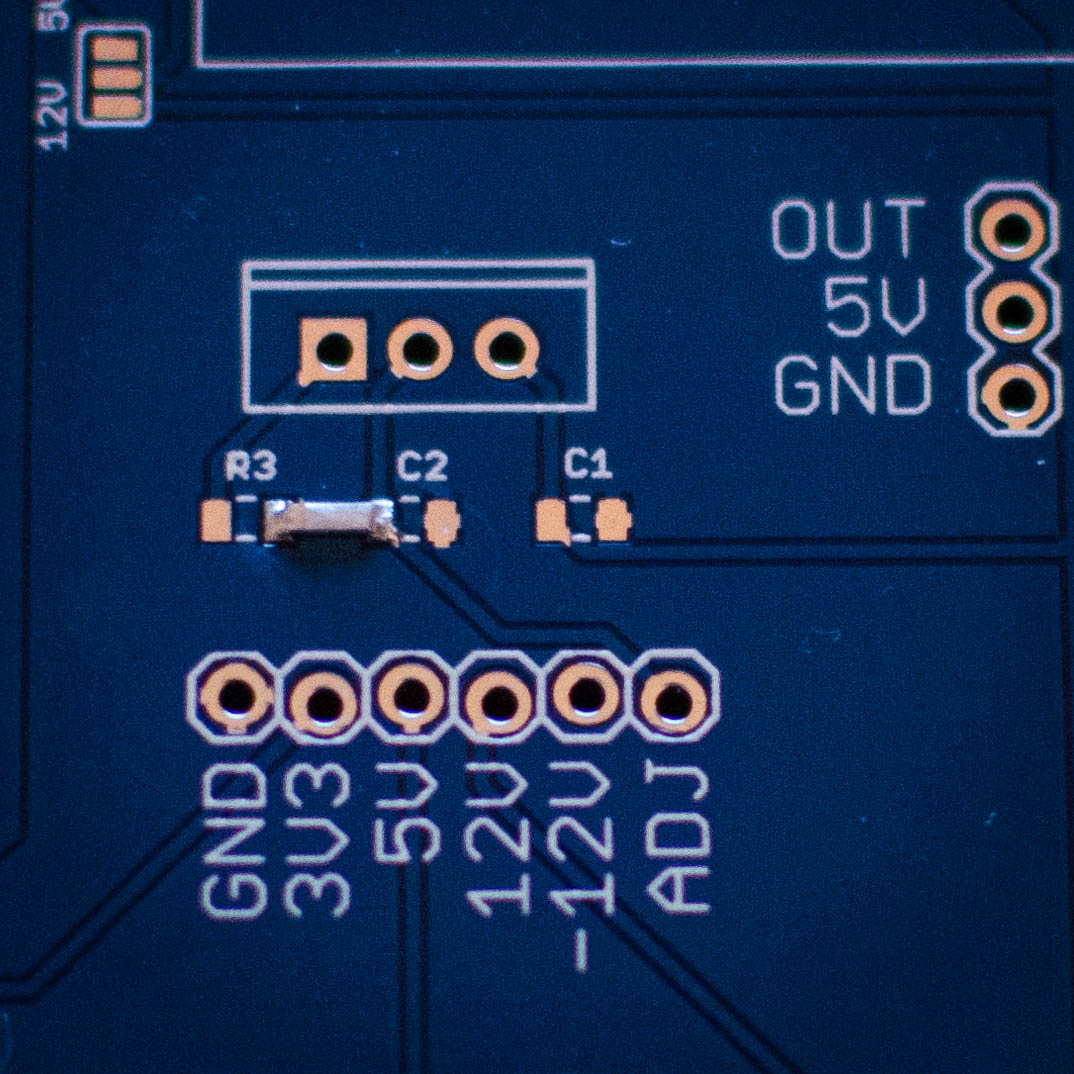
<p>After the boards arrived, I noticed a small issue: <strong>a connection from R3 to C2 was missing.</strong> The fix was quick and easy and I soldered a little piece of a component between the two pads of all my PCBs (excluding my test one, pictured from now on).</p>

<figure><a href="/assets/images/DSC_5551.jpg">
  <img src="/generated/assets/images/DSC_5551-800-5d5986.jpg" srcset="/generated/assets/images/DSC_5551-400-5d5986.jpg 400w, /generated/assets/images/DSC_5551-600-5d5986.jpg 600w, /generated/assets/images/DSC_5551-800-5d5986.jpg 800w, /generated/assets/images/DSC_5551-1000-5d5986.jpg 1000w" sizes="(max-width: 600px) 100vw, (max-width: 900px) 80vw, (max-width: 1200px) 60vw, (max-width: 1800px) 50vw, (min-width: 1801px) 40vw" />
</a>
<figcaption>Fixing the PCBs.</figcaption></figure>

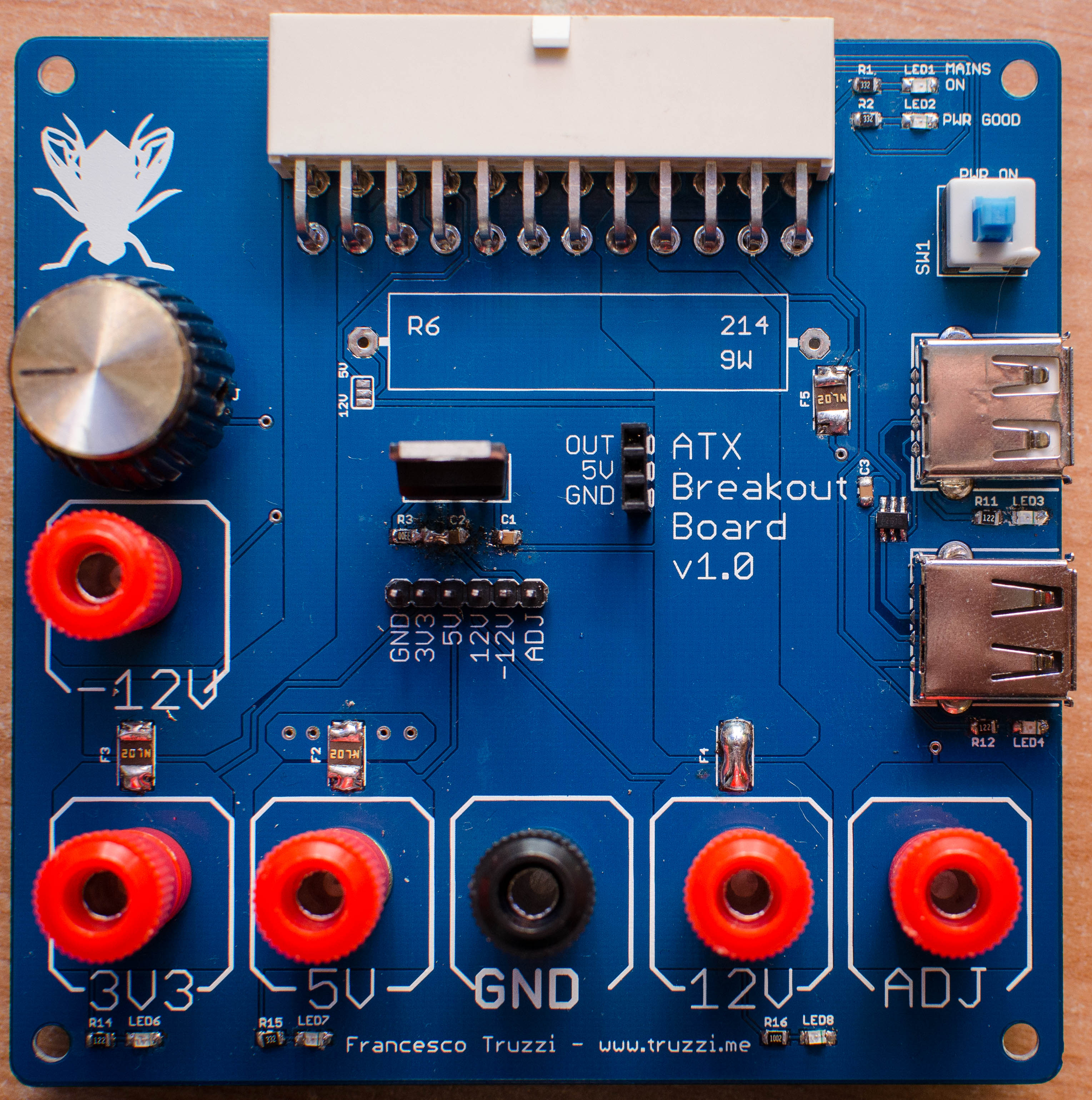
<p>This is how the board looks with all components soldered on:</p>

<figure><a href="/assets/images/DSC_5562.jpg">
  <img src="/generated/assets/images/DSC_5562-800-ce6ef7.jpg" srcset="/generated/assets/images/DSC_5562-400-ce6ef7.jpg 400w, /generated/assets/images/DSC_5562-600-ce6ef7.jpg 600w, /generated/assets/images/DSC_5562-800-ce6ef7.jpg 800w, /generated/assets/images/DSC_5562-1000-ce6ef7.jpg 1000w" sizes="(max-width: 600px) 100vw, (max-width: 900px) 80vw, (max-width: 1200px) 60vw, (max-width: 1800px) 50vw, (min-width: 1801px) 40vw" />
</a>
<figcaption>The complete board! F4 and R6 intentionally left out. Shitty soldering job indeed.
</figcaption></figure>

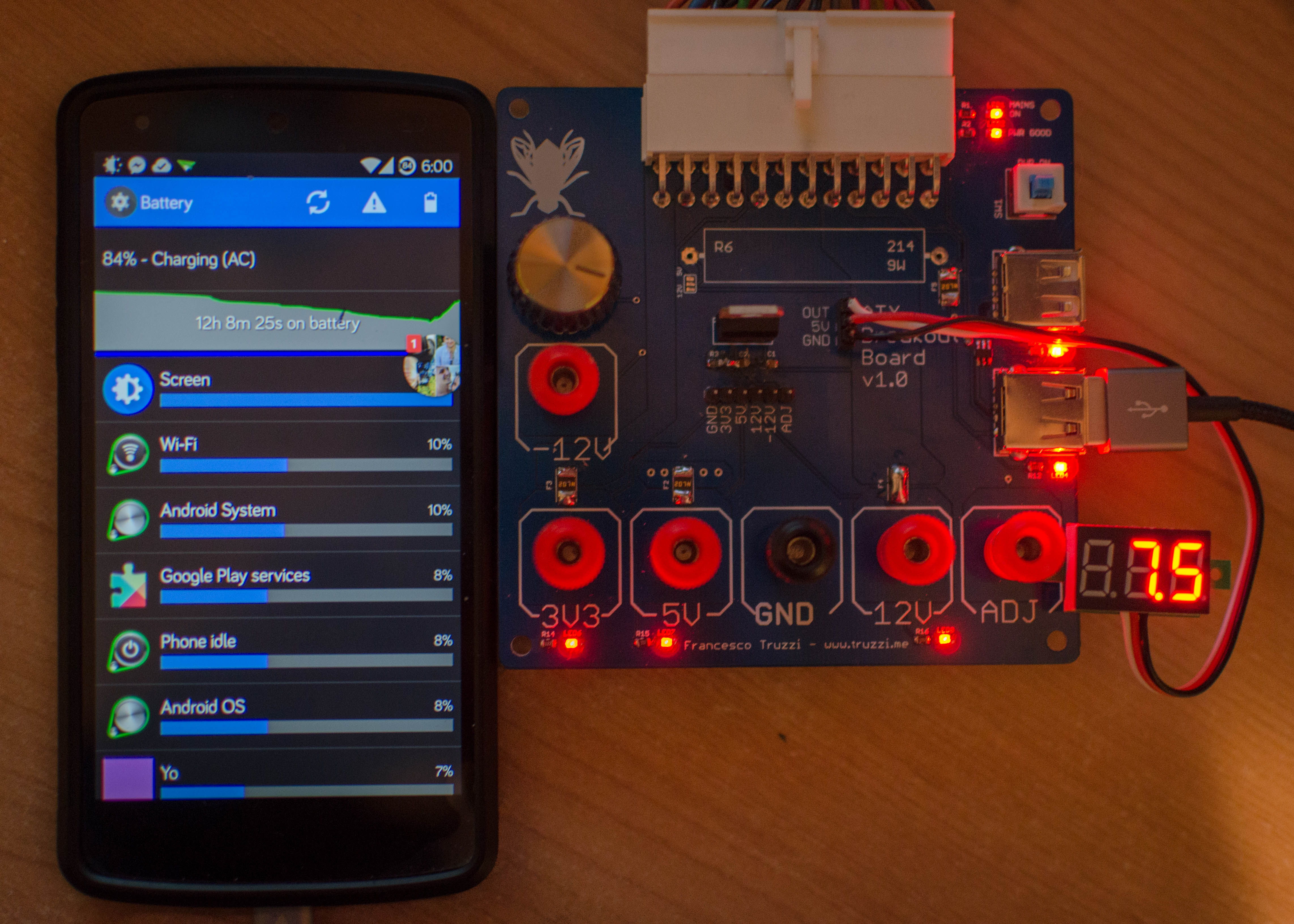
<p>And here it is up and running, charging my Nexus 5 at full speed. It also charges my iPad just fine.</p>

<p>Standoffs have yet to come in and I’m still figuring out whether I need the power resistor or not. There is also a voltmeter attached to the board, very handy.</p>

<figure><a href="/assets/images/DSC_5573.jpg">
  <img src="/generated/assets/images/DSC_5573-800-55ea9f.jpg" srcset="/generated/assets/images/DSC_5573-400-55ea9f.jpg 400w, /generated/assets/images/DSC_5573-600-55ea9f.jpg 600w, /generated/assets/images/DSC_5573-800-55ea9f.jpg 800w, /generated/assets/images/DSC_5573-1000-55ea9f.jpg 1000w" sizes="(max-width: 600px) 100vw, (max-width: 900px) 80vw, (max-width: 1200px) 60vw, (max-width: 1800px) 50vw, (min-width: 1801px) 40vw" />
</a>
<figcaption>Up and running, charging my Nexus 5.</figcaption></figure>

<p>I’m looking for some feedback from more experienced users so I can improve this board, maybe by making another revision (the next one will undoubtedly have a switching regulator!), and learn a bit more about PCB design. I am pretty happy with my first try though.</p>

<p>I made 10 pieces of this PCB, which was the MOQ. I’m keeping 2 of them but I need to get rid of the other 8. <strong>If you want one, just leave a message down here</strong> and you can get one for <strong>5€ (PCB only)</strong>, which is just a bit more than the cost for shipping worldwide.</p>

<p>Thanks everybody!</p>

<p>EDIT: The response from the community has been great! <strong>There are no more PCBs left</strong>. I’m planning on making another revision and Eagle files / Schematics are coming by the end of the week.</p>

<p>UPDATE: Eagle files available here. The missing connection has been fixed and traces widened. Breaking Bad references removed. Parts numbering is more correct now, yet I still need to update the main post. GitHub repo <a href="https://github.com/ftruzzi/ATX-Breakout-Mini">here</a>.</p>]]></content><author><name>{&quot;avatar&quot;=&gt;&quot;/assets/images/self.jpg&quot;, &quot;bio&quot;=&gt;&quot;Software Engineer&quot;, &quot;location&quot;=&gt;&quot;Milan, Italy&quot;, &quot;email&quot;=&gt;&quot;francesco@truzzi.me&quot;, &quot;uri&quot;=&gt;nil, &quot;home&quot;=&gt;nil, &quot;bitbucket&quot;=&gt;nil, &quot;codepen&quot;=&gt;nil, &quot;dribbble&quot;=&gt;nil, &quot;flickr&quot;=&gt;nil, &quot;facebook&quot;=&gt;nil, &quot;foursquare&quot;=&gt;nil, &quot;github&quot;=&gt;&quot;ftruzzi&quot;, &quot;gitlab&quot;=&gt;nil, &quot;google_plus&quot;=&gt;nil, &quot;keybase&quot;=&gt;nil, &quot;instagram&quot;=&gt;nil, &quot;lastfm&quot;=&gt;nil, &quot;linkedin&quot;=&gt;&quot;ftruzzi&quot;, &quot;pinterest&quot;=&gt;nil, &quot;soundcloud&quot;=&gt;nil, &quot;stackoverflow&quot;=&gt;nil, &quot;steam&quot;=&gt;nil, &quot;tumblr&quot;=&gt;nil, &quot;twitter&quot;=&gt;&quot;ftruzzi&quot;, &quot;vine&quot;=&gt;nil, &quot;weibo&quot;=&gt;nil, &quot;xing&quot;=&gt;nil, &quot;youtube&quot;=&gt;nil}</name><email>francesco@truzzi.me</email></author><category term="electronics" /><category term="atx" /><category term="board" /><category term="breakout" /><category term="design" /><category term="eagle" /><category term="pcb" /><category term="psu" /><summary type="html"><![CDATA[13/07/2015: PCBs of the new version have arrived. Blog post and store link! 30/06/2015: New version released, x20 PCBs printed and coming in the mail. New source files and details on GitHub – available for sale in a couple of weeks. 13/11/14: Eagle files have been uploaded, you can find the link at the bottom. Thank you for your interest! Many people over the internet have already found out the usefulness of having an ATX PSU, often salvaged from old computers, on their bench. It can be quite easily converted into a lab bench power supply (owners of a real one, please don’t kill me). There are lots of videos on how to add binding posts to your PSU and how not to, but I didn’t like any of these solutions. I tried the first one, but my power supply was so small and tightly packed that wires and binding posts wouldn’t fit right in it. I then came across Sparkfun’s &lt;/a&gt;and Dangerous Prototypes’ ATX breakouts. While I didn’t like the Sparkfun one, the one from Dangerous Prototypes convinced me a bit more. Yet, I felt like it lacked some features I needed. I wanted some USB ports to power my rPi and charge my Nexus 5, and an adjustable voltage output. Furthermore, my PSU had a 24-pin ATX connector. While I still consider myself a beginner in the enormous world of electronics, I decided to look up some guides on how to design a PCB (this time I’ve gotta thank you, Sparkfun! Both yours and Adafruit’s libraries and tutorials rock!) and have a try at it. Fast forward some days later, my very own ATX breakout board was born. Yes, it’s heavily based on the Dangerous Prototypes’ one, and I must thank them for this. I wouldn’t have been able to make one without them making theirs 🙂 The original board was 15 x 5cm and in my opinion had a much better design (the pot and 1 USB were on the front), but I resized it to 10x10cm in order to halve PCB manufacturing costs. As I said a few lines up, it’s my first PCB so comments and feedback are welcome, if not encouraged. These are the features I packed into it: It has a 24-pin ATX connector. Voltage lines are all broken out individually on binding posts. LM317-based voltage regulator. Using a 300 ohm resistor and a 2K ohm potentiometer, voltage range is 1.25-9V. 2 USB ports based on the TPS2513 from Texas Instruments. They can automatically detect what device is connected and adjust resistance on D+ and D- lines as needed. This means full compatibility and maximum charging speed on both Apple and Android devices. One of them is connected to 5v_STDBY, so that it works even when the PSU is off. Pretty much everything can be fused. I left -12V out because it can only carry low amounts of current on most PSUs (mine is 500mA maximum). Breadboard pin headers so that voltage lines can be connected to a breadboard using jumper cables. Voltmeter headers in order to know the LM317 output voltage. There is room for a 9W power resistor is your PSU needs it to stabilize output voltages. You can connect it either to the 5v rail or to the 12v one by jumpering the corresponding pads. Status LEDs on fused lines and USBs so you can check if everything works fine. Screw holes for standoffs. Breaking Bad art because yeah, this is science, bitch. The final PCBs. Love the blue solder mask. And this is the list of components you’d need to build it. All SMD parts are 0805 or bigger, because 0603s are so small they get lost on my messy desk. C1, C3: 0.1uF 0805 SMD capacitors. C2: 1uF 0805 SMD capacitor. F1, F2, F3, F4, F5: 1812 SMD PTC resettable fuses. (Littelfuse ones should work just fine, I used Bourns instead which are a bit larger). J1: 24-pin ATX connector. I bought mine from Sparkfun but RS also sells them. JP1: 3-pin header (for voltmeter output) JP2: 6-pin header (for breadboard output, fused) LED1, LED2, LED3, LED4, LED5, LED6: 0805 SMDs, choose the color you want but make sure to use appropriate resistors. You may not want full brightness and sure you don’t want magic smoke. R1, R2, R11, R12, R15: 3.3K ohm, 0805. R3: 330 ohm, 0805 (value may change – double check LM317 voltages). R16: 10k ohm, 0805. R6: 9/10W power resistor, not needed in my case. R14: 1.2k ohm, 0805. T1, T2, T3, T4, T5, T6: binding posts with 4mm hole. You may want some red ones for the positive lines and a black one for GND. U1: LM-317, through hole. There should be enough space for a heatsink. U2: TPS2513 from Texas Instruments. If you don’t have them, look up the datasheet and solder appropriate resistors on D+ and D- pins of the USB ports. X1, X2: USB female connectors, through hole. Resistor numbers are off, I know. I tried to stick to PCB design rules and to minimize the number of vias but I’m not sure I like the way I traced traces (:D). I made them as thick as possible, without diving into maths or trace width calculators, but they should be enough for most applications. After the boards arrived, I noticed a small issue: a connection from R3 to C2 was missing. The fix was quick and easy and I soldered a little piece of a component between the two pads of all my PCBs (excluding my test one, pictured from now on). Fixing the PCBs. This is how the board looks with all components soldered on: The complete board! F4 and R6 intentionally left out. Shitty soldering job indeed. And here it is up and running, charging my Nexus 5 at full speed. It also charges my iPad just fine. Standoffs have yet to come in and I’m still figuring out whether I need the power resistor or not. There is also a voltmeter attached to the board, very handy. Up and running, charging my Nexus 5. I’m looking for some feedback from more experienced users so I can improve this board, maybe by making another revision (the next one will undoubtedly have a switching regulator!), and learn a bit more about PCB design. I am pretty happy with my first try though. I made 10 pieces of this PCB, which was the MOQ. I’m keeping 2 of them but I need to get rid of the other 8. If you want one, just leave a message down here and you can get one for 5€ (PCB only), which is just a bit more than the cost for shipping worldwide. Thanks everybody! EDIT: The response from the community has been great! There are no more PCBs left. I’m planning on making another revision and Eagle files / Schematics are coming by the end of the week. UPDATE: Eagle files available here. The missing connection has been fixed and traces widened. Breaking Bad references removed. Parts numbering is more correct now, yet I still need to update the main post. GitHub repo here.]]></summary></entry></feed>